

What Is A2UI 1.0? Agent UI, Security & Approval Tests
What is A2UI 1.0 and how does it work? Explore agent-generated UI, React/SwiftUI renderers, JSON component catalogs and an independent seven-test security lab on approval vs. tool access.
Evidence 7 cited sources
On this page
What Is A2UI 1.0? Agent UI, Security & Approval Tests
What is A2UI 1.0 (Agent-to-User Interface)? It is a declarative JSON protocol for agents to describe interactive interfaces that a host application renders through its own approved components, rather than executing agent-supplied HTML or JavaScript. An AI agent can produce a detailed plan in seconds. Yet a paragraph of text is a poor interface when a user needs to compare options, adjust parameters, preview a report, or approve a consequential step. Agent-generated interfaces promise a better interaction model. They also introduce a trust question: if the agent proposes a button, can clicking that button give the agent permission to perform a real-world action?
The answer should be no. An agent may describe an interface, a trusted host must decide how to render it, a user may interact with that preview, and a separate execution layer must determine whether a tool call is actually authorized. UI generation, user activation, and tool authorization are distinct boundaries.
Google announced the stable A2UI 1.0 protocol on November 11, 2026. Its release describes open-source renderers for web frameworks, Flutter and SwiftUI, while noting that the Jetpack Compose renderer supports version 0.9.1 with 1.0 still to come. Those are vendor-reported platform capabilities, not results of our own mobile-device testing. See the official announcement and the A2UI 1.0 specification.
Instead of reposting the release, XBSTACK built a small, deliberately restricted UI-message prototype and ran six Node unit tests plus one isolated Chrome interaction test. All 7/7 tests passed. The Chrome test covers both a 1280px desktop viewport and a 390px mobile viewport. This article explains exactly what those tests demonstrate—and, equally importantly, what they do not.
1. A2UI is a UI description protocol, not an HTML code generator
In A2UI, an agent sends a JSON-based stream describing UI elements and data. A host application interprets that stream using components the application itself has registered. The model does not need to generate full React code or hand an arbitrary HTML document to the browser.
The separation matters in three ways. First, the host retains control over its design language and component implementation. Second, an interface can update incrementally as new data or components arrive. Third, the host can reject elements that fall outside its approved catalog.
In AIGC and AI coding workflows, a coding assistant could use this generative UI pattern to present test-result cards, choose between proposed fixes, or request review of a code change. A2UI does not generate or validate the underlying code, nor does it replace a programmer: it describes the interface, while the host and its backend retain control over real edits and tool calls.
None of this means “JSON makes an application secure by default.” A badly implemented renderer can still introduce injection vulnerabilities by placing untrusted values into executable HTML, accepting unsafe URLs, or dispatching powerful actions without validation. The security boundary is enforced by the host implementation, not by a marketing claim about a data format.
A2UI 1.0 includes a richer protocol than our example, including bidirectional function calls and accessibility-related semantics. Treat each actual SDK and platform renderer as a separate compatibility and security test target. A stable wire format is not proof that every client version behaves identically.
How do you use A2UI? Start with one agent-generated form
The practical starting path has three parts: choose a host renderer and an approved component catalog (for example, text, cards, inputs and buttons); stream JSON messages that create the view and update its data; then let the host validate the user’s interaction before passing a well-defined event to your application. A travel agent could propose several route cards, update travel times and prices, and collect a final selection without writing arbitrary HTML for the host to execute.
Google lists React, Angular, Lit, Flutter and SwiftUI renderers, but you must check actual platform and protocol versions. As of November 12, 2026, Google’s announcement still puts Jetpack Compose on 0.9.1, with 1.0 support pending. For a complete official starter project, use the Google A2UI Codelab. The Node/Chrome example below is a purpose-built security boundary experiment, not an official SDK tutorial.
A2UI vs AG-UI vs MCP Apps vs Function Calling
| Technology | Primary responsibility | Relationship to A2UI |
|---|---|---|
| A2UI | Declarative JSON UI structure, components and data binding | The focus of this article; the host renders approved components |
| AG-UI | Event and state interaction between an agent runtime and a frontend | Can transport A2UI messages |
| MCP Apps | Custom embeddable UI supplied through MCP, commonly sandboxed in an iframe | Can be combined with A2UI for different UI needs |
| Function Calling | A model proposes structured tool arguments; the application decides whether to execute | Tool calling is neither a UI renderer nor automatic authorization |
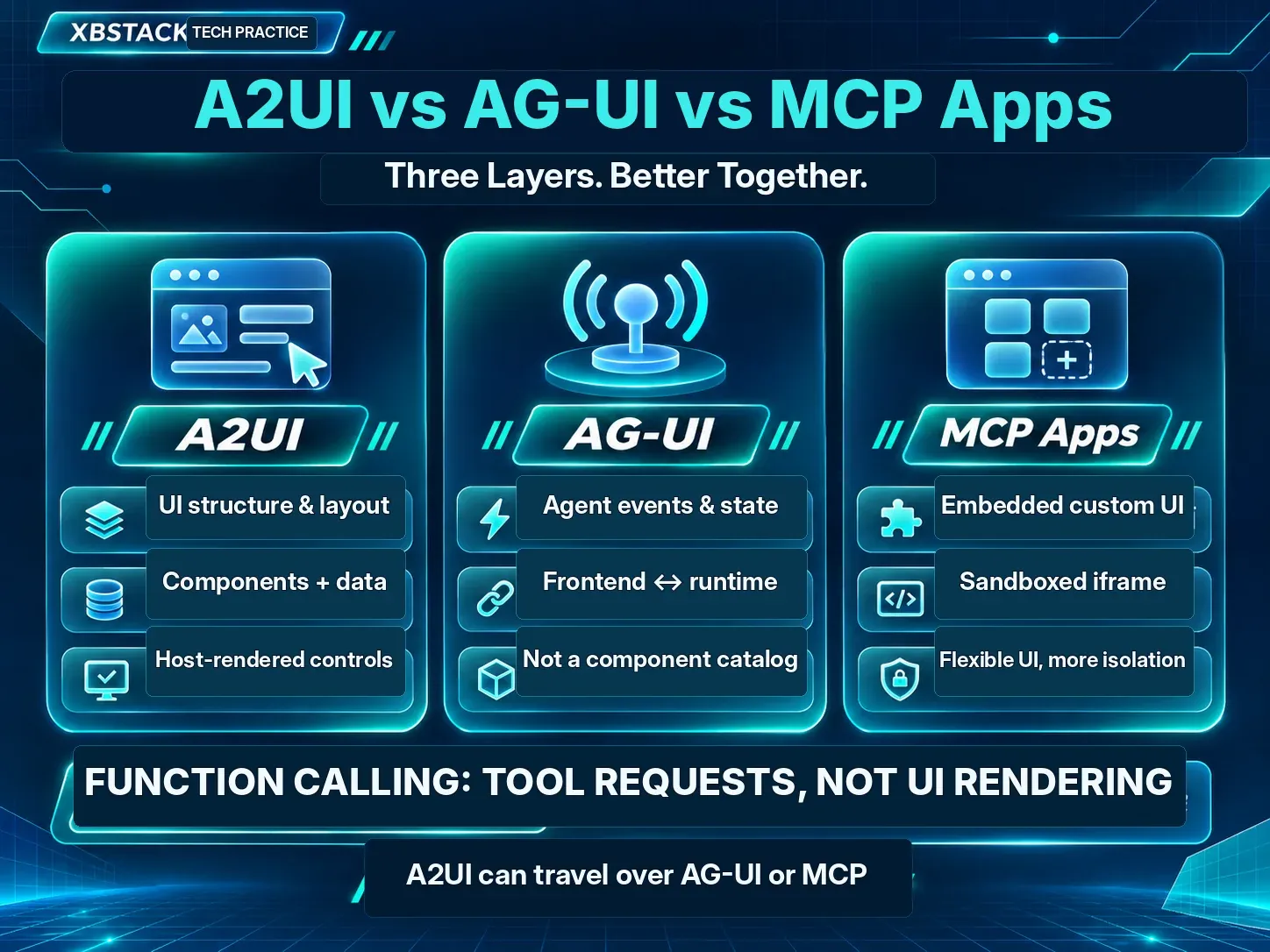
These layers solve different engineering problems. A2UI does not inherently replace AG-UI or MCP Apps, and it cannot turn a button click into an entitlement to execute tools. See Google’s A2UI and MCP Apps architecture guide and the AG-UI protocol overview.
2. Four interface messages—and what they do not authorize
Our lab focuses on only four A2UI-1.0-shaped message types. The official protocol also defines additional function-call envelopes, which our prototype does not implement.
| Message | UI responsibility | Not implied |
|---|---|---|
| createSurface | Create a named view and initialize components and data | Access to private user files |
| updateComponents | Add or update component definitions | Permission to register executable widgets |
| updateDataModel | Change values bound to the view | Permission to evaluate a value as code |
| deleteSurface | Remove that view from the renderer | Permission to delete a business record |
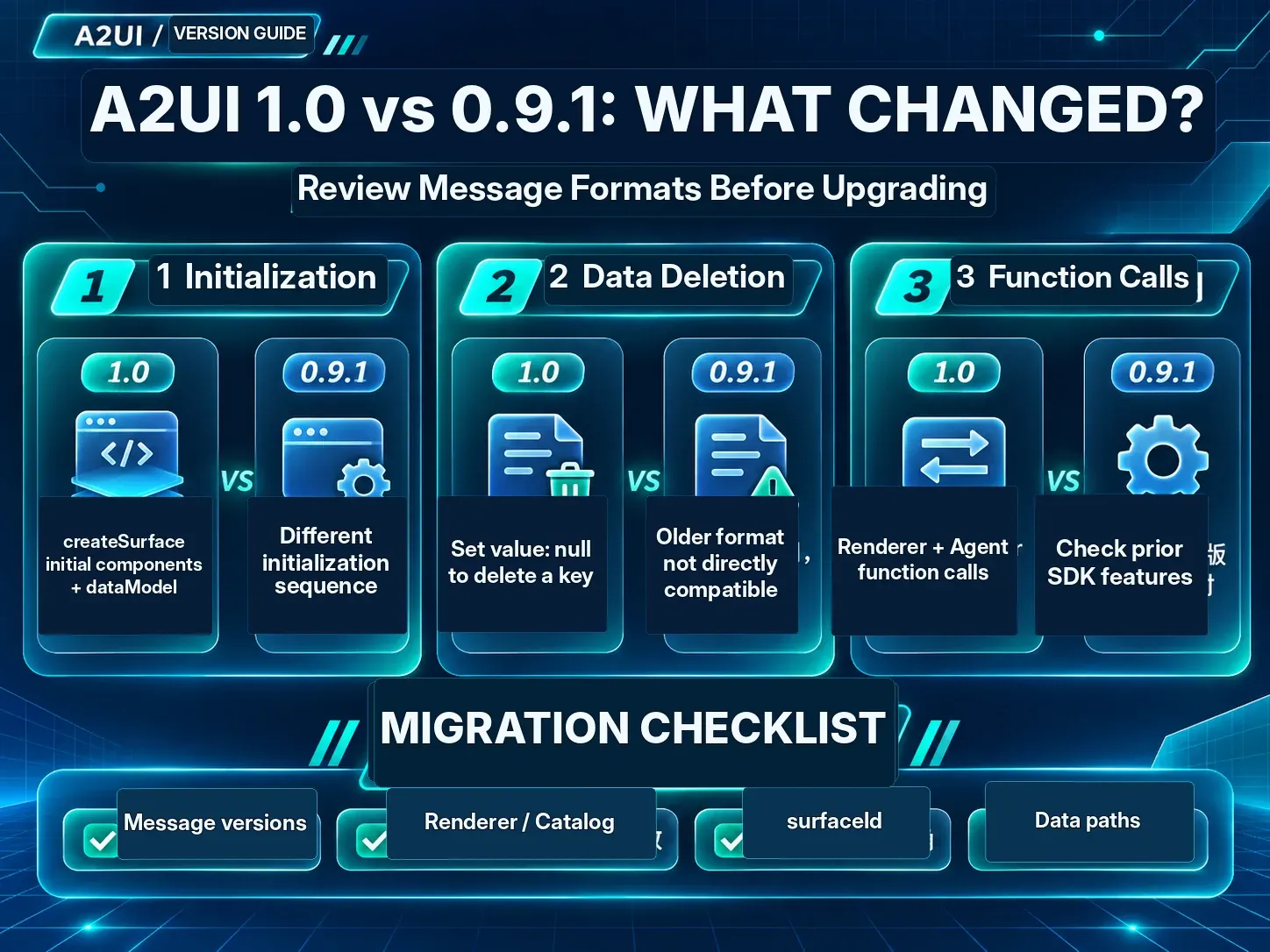
What changed from A2UI 0.9.1 to 1.0?
Check at least three migration differences. First, v1.0 can supply initial components and dataModel inline with createSurface, whereas the 0.9.1 initialization pattern differs. Second, v1.0 uses an explicit value: null to remove a data-model key, not the 0.9.1 convention of omitting value. Third, v1.0 adds bidirectional function-call messages including callRendererFunction and callAgentFunction; a host must explicitly control which catalog functions and real-world side effects are permitted. See the official A2UI message reference.
If a UI fails to appear after upgrading, data binding no longer resolves or you suspect a version mismatch, check whether the emitting agent, renderer, catalog and schema all implement the same protocol version. Then verify surfaceId, component references and JSON Pointer paths. These are diagnostic checkpoints, not claims that we reproduced a bug in an official SDK.
Consider this minimal input. It describes a report preview, not an instruction to send email, refund a payment, or change production infrastructure:
{
  "version": "1.0",
  "createSurface": {
    "surfaceId": "report_preview",
    "catalogId": "https://a2ui.org/specification/v1_0/catalogs/basic/catalog.json",
    "components": [
      {"id":"root","component":"Column","children":["summary"]},
      {"id":"summary","component":"Text","text":{"@path":"/summary"}}
    ],
    "dataModel": {"summary":"Proposed read-only site audit report"}
  }
}
The host must still validate component names, child IDs, value types, paths, limits and event capabilities. A plausible-looking JSON object is not sufficient evidence that it should become a trusted view.
3. A reproducible local test: what was actually blocked?
The XBSTACK research harness intentionally uses just four approved component types—Column, Card, Text and Button—and two inert event names: request_approval and cancel_preview. Text is rendered by creating DOM nodes and assigning their textContent; the sample does not concatenate model-supplied HTML into innerHTML.
The source is public: XBSTACK AI Site Kit — controlled A2UI preview. Run the portable core test suite in a terminal:
git clone https://github.com/xbstack/xbstack-ai-site-kit.git
cd xbstack-ai-site-kit
node --test examples/a2ui-1-0-controlled-preview/core.test.mjs
An optional browser test requires playwright-core and the macOS Chrome application used by our fixture:
npm install --no-save playwright-core
node --test examples/a2ui-1-0-controlled-preview/browser.test.mjs
The browser test contains a fixed macOS Chrome executable path. Windows or Linux users will need to configure a suitable Chrome executable. Neither command needs an AI model API key, a cloud service, a production system, or credentials.
Observed in the November 12 local run: 7 tests passed, 0 failed. Six are Node cases; one is a combined isolated headless Chrome test across desktop and mobile-sized viewports. That is not a benchmark over seven models, seven browsers or seven devices.
| Boundary checked | Observed result in this sample |
|---|---|
| Surface creation, component updates, data updates, deletion | Controlled store lifecycle behaved as expected |
| Unknown components and unauthorized events | A simulated RemoteScript component and unknown events were rejected |
| Component references and unsafe model keys | Cycles, dangling references and prototype-pollution paths were rejected |
| HTML-looking data | An img/onerror string displayed as text; no img element was created |
| Approval and cancel buttons | Local dialogs/events were recorded; external tool calls remained at zero |
| Browser interaction | Both viewports completed the flow with no captured page errors or nonlocal requests |
The injection result is a narrow and meaningful observation: the sample renderer did not parse the injected HTML-looking value as an element. It is not a proof that all third-party renderers are XSS-free; rich-text components, URLs, embedded resources, CSS values and extensible catalogs require additional negative testing.
4. A visible approval button is not a tool authorization decision
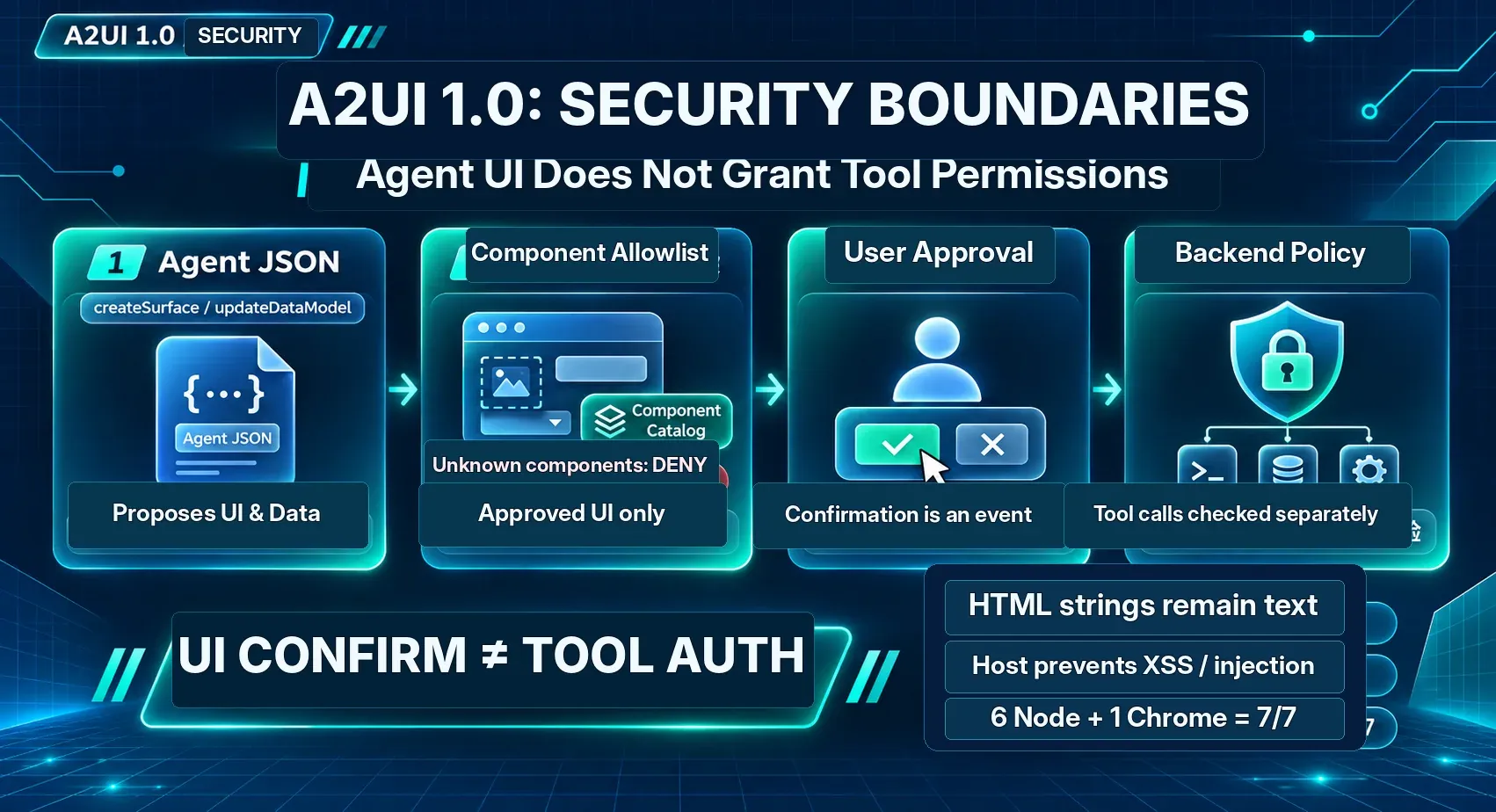
A practical system has at least three separate actors:
- Agent and UI description: propose what to display and which input to collect.
- Host renderer and interaction handler: decide what components and events are permitted, then collect a human decision.
- Backend executor and Policy Gate: decide whether that exact action is authorized under trusted identity, tenancy, scopes, target ownership, arguments, risk and idempotency policy.
Suppose an agent proposes a refund form. The customer clicks Confirm. That interaction alone does not establish that the target order belongs to the current user, that the amount has not been changed since the preview, that the actor has the right scope, or that a retry will not issue a second refund.
Before executing a side effect, the backend should independently validate a trustworthy principal, the resource, the exact argument set and the applicable policy version. Higher-risk operations may require stronger authentication. Queue redelivery and double clicks additionally require idempotency controls.
For the full backend design, see our earlier article on AI Agent Tool Authorization, Policy Gates and Human-in-the-Loop. It answers a different reader question. The A2UI lab here deliberately does not implement that production authorization layer.
A2UI 1.0 also specifies function-call and user-activation concepts. Their protections depend on how the chosen renderer and its host enforce them. A button named “approve” cannot, by naming alone, become an entitlement to call an arbitrary remote function. See CopilotKit’s 1.0 overview.
5. Five failure modes to test before production
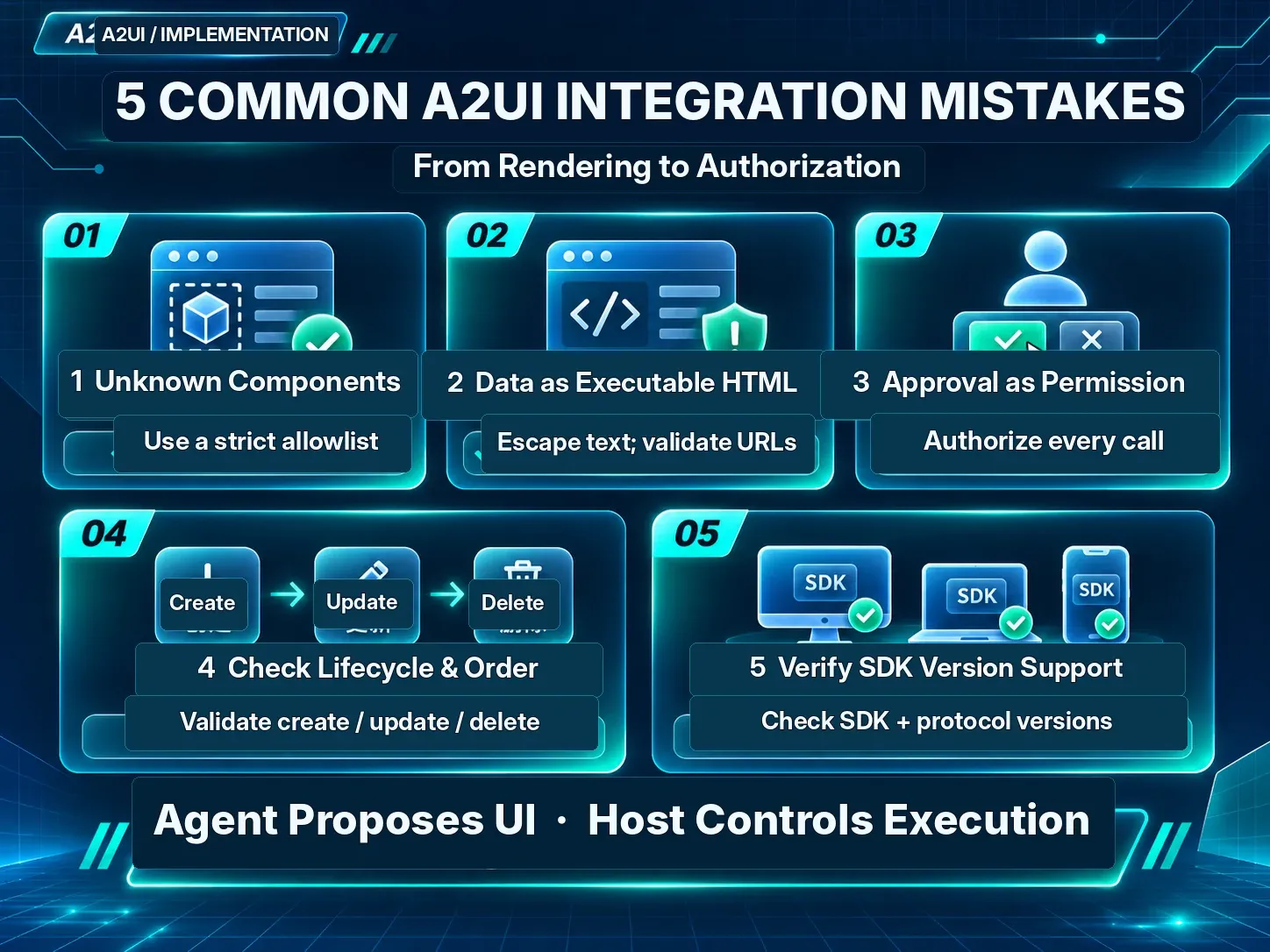
1. A catalog that accepts unknown components. Default-deny component registration and reject unsupported properties or child references. Returning an error is safer than silently attempting to interpret an unfamiliar UI capability.
2. Confusing data with markup. Treat ordinary text as text. URLs, rich text and file references require their own parsing, escaping and destination rules. One successfully rejected HTML string does not validate all component extensions.
3. Treating UI consent as server permission. Bind the approval to a concrete action, actor, resource, argument digest and expiry. Re-authorize just before the actual side effect, and re-evaluate if anything material has changed.
4. Incorrect streaming lifecycle handling. Define behavior for updates before creation, duplicate IDs, stale events, interrupted streams, deleted surfaces and replayed messages. Do not quietly apply an old event to a newly created view.
5. Assuming all platforms implement protocol 1.0. According to Google’s November 11 announcement, web renderers and Flutter and SwiftUI options are available, while Jetpack Compose was still on 0.9.1. Validate the exact runtime, SDK version, control semantics, accessibility behavior and failure handling for each device family separately.
6. Should an independent developer adopt A2UI now?
It is worth evaluating when agents need structured, interactive approval and preview workflows across multiple host UI frameworks—and when you are prepared to maintain the component catalog, interaction state, backend security boundary and cross-platform regression tests.
It is a weaker fit for an application that only needs one static form, cannot validate renderer semantics across supported platforms, or expects a declarative UI protocol to replace authentication and tool-level authorization.
A sensible rollout order is one small read-only scenario → component and data allowlists → negative-input testing → user interaction verification → backend authorization and idempotency → official SDK compatibility tests on each platform. The present XBSTACK lab covers only a subset of this path.
The central lesson is simple: an agent may propose the interface, but the trusted host must retain control of both rendering and execution permissions. That boundary matters long after the release announcement stops being news.
Primary sources, code and related reading
- Google Developers: A2UI 1.0 release, November 11, 2026 — vendor claims and platform support.
- A2UI 1.0 protocol specification — message types, lifecycle and function envelopes.
- Google Codelabs: Build rich agent interfaces with ADK and A2UI — official starter path rather than this security experiment.
- CopilotKit: Introducing A2UI 1.0 — user activation and additional implementation semantics.
- XBSTACK reproducible controlled-preview example — local test cases and limitations.
- AI Agent Protocol Ecosystem and Per-call Tool Authorization — complementary architecture questions.
Continue from one agent pattern to the complete production system
The AI Agent hub organizes architecture, memory, tool use, evaluation, security, deployment and multi-agent coordination into a single learning path.
Next step: harden the execution boundary
Full decision path →Continue with the control that should be enforced before the next tool call, credential handoff, or production rollout.

DISCUSSION
Questions, verification and corrections
Sign in to comment. Every new comment is reviewed before publication; while pending, it is visible only to you and the administrator.