

ChatGPT Account Suspended? How to Tell a 24-Hour Safety Pause from a Permanent Closure
A ChatGPT login failure is not always a ban. Learn to distinguish suspicious-login restrictions, a 24-hour safety pause and permanent closure.
On this page
First, do not treat every sign-in failure as an account ban
If ChatGPT suddenly stops working, do not immediately create another account, switch email addresses, or search for an alleged “unban trick.” First record the exact sign-in message, check the notification email, confirm the original sign-in method, and check service status. A routine login error, suspicious-login restriction, device or payment limit, 24-hour safety suspension, and permanent account closure are different states with different next steps. Treating every sign-in problem as a ban can lead to the wrong response and make a recoverable login issue harder to resolve.
As of November 8, 2026, public social channels contain user reports of lost access, subscription problems, and delayed appeals. However, I found no verifiable OpenAI announcement confirming a unified mass-ban or mass-false-positive event affecting all users, a particular region, or a defined account category over the previous two days. Post counts, reposts, and comment volume are not platform-wide enforcement statistics. A single user’s statement that they did nothing wrong is not, by itself, proof of a false positive either. The defensible conclusion is narrower: account deactivation and safety restrictions are real risks worth understanding, but the claim that a large wave began yesterday remains unconfirmed.
1. Identify which account state you are seeing
A conversation ending is not an account deactivation
OpenAI says ChatGPT may warn a user and then end a conversation when it raises serious concerns about violence or harm to others. The ended conversation will no longer appear in chat history or search results, but that action alone does not mean the account has been permanently closed. The user may still be able to start other conversations unless a separate account restriction is applied.
A 24-hour safety suspension is not a permanent ban
OpenAI’s current help article says that after repeated conversation endings, ChatGPT may temporarily suspend an account for 24 hours if further conversations continue to raise serious concerns about violence or harm to others. The user is signed out immediately and cannot sign in or use ChatGPT while the suspension is active. Access normally returns after 24 hours unless a separate account action also applies. This is a narrowly defined safety intervention, not a general rule that discussing any sensitive topic automatically causes a ban.
The intervention applies to personal ChatGPT accounts in Chat mode. It does not apply to conversations inside Business, Enterprise, Edu, or Healthcare workspaces, and is not available in Work mode, Codex, or voice mode. One important nuance: if a personal account is linked to multiple workspaces, the user may be unable to access any of those workspaces—including Business, Enterprise, or Edu—while the 24-hour suspension is active. Read the notification email and follow its instructions; do not mistake the temporary period for permanent closure.
Permanent account closure is a separate action
OpenAI lists several reasons an account may be deactivated: a Usage Policy violation, a Terms of Use violation, a security concern or suspected compromise, repeated violations after a warning, or failure to complete required identity or age verification. OpenAI also says that discussing a sensitive topic does not, by itself, mean an account will be permanently closed. The action depends on the activity and the applicable policy.
The Terms of Use also allow OpenAI to suspend or terminate access when a user violates the terms or Usage Policies, when the law requires it, or when use of the service may create risk or harm to OpenAI, its users, or others. Whether a particular decision was mistaken requires the account notice, relevant activity, and the platform’s review—not a conclusion drawn from a single screenshot or online rumor.
A security restriction is not necessarily a content-policy penalty
OpenAI may restrict access when activity suggests that someone else has accessed an account. This is different from a temporary safety suspension related to violence or harm, and should not automatically be treated as a content-policy penalty. If compromise is possible, change the password, review unfamiliar activity and charges, rotate any exposed API keys, and report the suspected unauthorized access through official support if you cannot sign in.
Rule out ordinary sign-in errors and suspicious-login restrictions first
A message such as “We have detected suspicious login behavior” is not, by itself, proof of permanent account deactivation. Confirm the original account email and sign-in method (email/password, Google, Microsoft, or Apple). If you signed up with Apple and enabled Hide My Email, continue with the same Apple account rather than switching to your personal email. Then follow OpenAI’s troubleshooting guidance: clear browser cache and cookies, try a private window or another browser/device, temporarily disable extensions that interfere with verification, and switch between Wi-Fi and mobile data. You may briefly pause a personal VPN or proxy; on a company- or school-managed device/network, ask IT before changing organizational proxy or security settings. Some suspicious-login notices advise waiting up to about one hour before trying again. Also check the OpenAI status page for an active service issue. If the screen explicitly says the account is deactivated or you received a closure notice, move to the account-review process instead of repeatedly retrying.
“Device limit reached” means the paid account cannot be used on that device; it does not, by itself, mean the account was permanently closed or compromised. A separate card/device purchase limit can block a new subscription when too many subscriptions are associated with the same card or device. That is different from a bank decline, an existing subscription cancellation, or an account ban. OpenAI applies device limits to paid Go, Plus, and certain Pro plans; Free and Business, Enterprise, and Edu workspace plans do not count toward the limit. Save the exact notice and verify the original account and device. Contact Support if you believe the restriction is incorrect. For this specific Device limit reached warning, OpenAI’s help page offers a cancel-and-refund option for ChatGPT or Google Play purchases; Apple App Store purchases must be canceled and refunded through Apple. This ends the affected subscription—it is not a general device-limit reset. Choose it only if you intend to end the subscription, and do not buy again just to test the restriction.
2. How to appeal an account closure
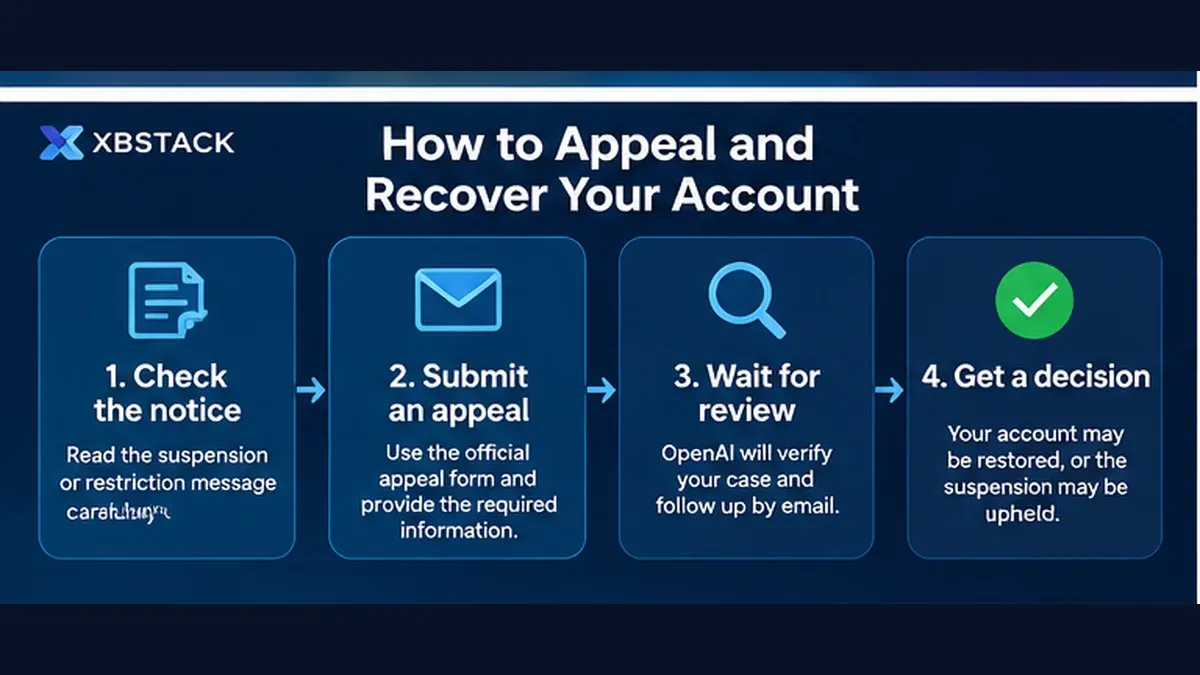
If you receive a permanent account-closure notice, start with the appeal link in the notification email. OpenAI says this helps route the request to the appropriate review process. If you cannot access that email, use the official account-closure appeal form. If you have lost access but received no closure email, contact OpenAI Support through the Help Center.
A useful appeal is specific and verifiable. OpenAI asks users to include their User ID and Organization ID, if available; relevant context about account activity; why they believe the closure was mistaken; the date range of any suspected compromise; and steps already taken to secure the account or resolve the issue. If there are unrecognized charges, provide the charge dates, amounts, last four card digits, card brand, issuing bank, and billing postal code. Do not send a complete card number or security code.
An appeal does not guarantee reinstatement. Keep the case number, email thread, notice, and a clear timeline. Repeatedly submitting the same text is less useful than adding relevant evidence. If the account may have been compromised, separate the security response from the policy appeal: explain which credentials were secured and which API keys were rotated, then explain which account action you believe should be reviewed.
3. Can you export your ChatGPT data after an account is disabled?

This is easy to misunderstand. OpenAI provides two data-request routes: an export from ChatGPT settings for an eligible account that can still sign in, or a request through the Privacy Portal. The settings-based export is unavailable while logged out. If you cannot sign in, OpenAI directs users to the Privacy Portal. However, the documentation does not promise that every permanently disabled account can export all data or recover every conversation. “You can submit a data request” is not the same as “you can always recover every chat after a ban.”
If you can still sign in, request an export and verify that the ZIP contains the conversations you need. OpenAI says an export email can take up to seven days to arrive, and its download link expires 24 hours after delivery. The ZIP includes chat history and other relevant account data, but cannot restore conversations that were already deleted. Business, Enterprise, and Healthcare workspaces do not offer the personal settings-based self-service export; contact the workspace owner or administrator. Edu export eligibility depends on the user role, workspace settings, and data-residency configuration. If you cannot sign in, use the Privacy Portal and official support to confirm which data-request route is available. Avoid third-party tools that promise to bypass a ban or recover every conversation, and never share account verification codes or API keys with strangers.
4. How should you check subscriptions and charges after deactivation?
Account access and subscription billing are separate questions that need to be checked independently. OpenAI’s current account-closure guidance says eligible self-serve subscriptions billed directly by OpenAI stop renewing after an account is deactivated. The subscription may remain active until the end of the current billing period, but the user cannot access the service while the account is deactivated. If the account is reinstated before the subscription ends, an eligible Stripe subscription may resume automatic renewal after all applicable restrictions are lifted. This does not recreate a subscription that has already ended or reverse a separate cancellation. Subscriptions purchased through Apple App Store or Google Play do not currently resume automatically. The guidance does not apply to Enterprise contracts.
Refunds, renewal, and account restoration remain separate issues: stopped renewal does not mean an automatic refund. Check a chatgpt.com purchase in ChatGPT billing settings; Apple App Store purchases are managed by Apple; and Google Play purchases are managed by Google Play. If you cannot access the original ChatGPT account or cannot identify which account owns the subscription, contact OpenAI Support with the purchase platform, account email/sign-in method, error message, and receipt or order details. Also check the subscription status in the store that billed you. Do not buy again until you have checked the original purchase to avoid duplicate charges.
5. What should you check before assuming a mass-ban rule?
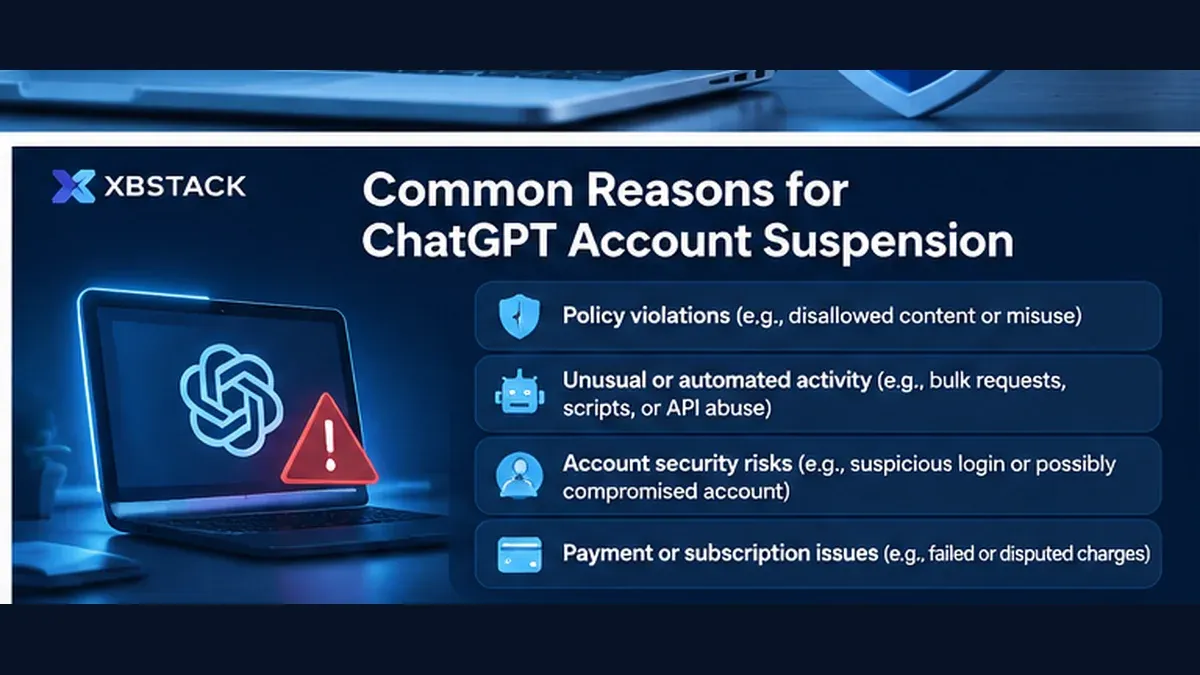
OpenAI’s help pages identify policy violations, terms violations, circumvention of security or access restrictions, inappropriate account or API-key sharing, suspected compromise, repeated violations after warnings, and incomplete identity or age verification as possible causes. It is important to separate those documented risks from explanations circulating online. For example, a user’s guess that an IP address, payment region, or frequent device switching caused a ban is not evidence that OpenAI has adopted a universal enforcement rule based on that factor.
If you use third-party tools, shared team environments, or your own gateway, check whether account credentials or API keys are being shared, whether keys may have leaked, whether calls came from unfamiliar devices, and whether any access restriction was bypassed. OpenAI’s Terms of Use restrict certain forms of inappropriate sharing and circumvention. For API developers, OpenAI also recommends protecting credentials and considering the Moderation endpoint where appropriate.
6. The bigger risk is keeping all your work inside one provider account
Account availability is ultimately a vendor-dependency problem. ChatGPT, Claude, and other model services can all be affected by security reviews, policy enforcement, identity checks, or service interruptions. For an occasional chat, that may be a temporary inconvenience. For a developer who keeps years of research, code decisions, product documentation, and agent workflows in one cloud conversation history, losing access can be much more disruptive.
A more resilient design treats a model service as a replaceable inference endpoint, not the only data store. Keep original documents, source code, important decisions, project constraints, and reusable knowledge in storage you control. Export provider data when the provider makes it available. Separate API keys from account-login credentials. Preserve portable workflow configuration and a manual recovery path for important automations. None of these steps prevents a provider from restricting an account, but they reduce the operational damage if access is lost.
This is one reason local-first knowledge management and Agent Memory deserve careful engineering. The model performs inference; your own repository preserves long-term assets; retrieval and memory layers supply the context needed by whichever model is available. If one provider becomes unavailable, you still retain your source data, knowledge structure, and work history instead of rebuilding everything from scratch. If you build agents with APIs, also review OpenAI Zero Data Retention and API data-retention boundaries; account deactivation, application data retention, and provider-side retention are separate concerns.
7. A practical response sequence
- Save the sign-in message, notification email, and timestamp. Identify whether this is a routine login error, suspicious-login restriction, device/payment limit, 24-hour safety suspension, or permanent closure.
- Check the registered email and official notices. Do not submit credentials through search ads, unsolicited messages, or unofficial support accounts.
- If compromise is possible, change the password, review unfamiliar charges, and rotate exposed API keys.
- If the account was permanently closed and you believe the decision is wrong, use the appeal link in the notice. If the email is unavailable, use the official account-closure appeal form; if no notice arrived, contact the Help Center.
- If you can still access the account, request and verify a data export. If you cannot sign in, use the Privacy Portal and support to confirm the available data-request options.
- Check the actual purchase channel—chatgpt.com, Apple App Store, or Google Play—and verify subscription ownership and renewal separately. Do not buy again before checking the original purchase.
- Move important future work into storage you control and keep an alternative path for model-service interruptions.
Frequently asked questions
Does a 24-hour ChatGPT suspension mean the account is permanently banned?
No. OpenAI distinguishes a 24-hour temporary safety suspension in a specific context from permanent account closure. Access normally returns when the suspension ends unless a separate account action also applies.
Can discussing a sensitive topic alone cause permanent deactivation?
Do not infer permanent deactivation from the topic alone. OpenAI says account actions depend on the content, context, activity and applicable policies. The 24-hour suspension is tied to repeated conversation endings followed by further serious concerns about violence or harm to others.
Can I recover an account that says it was deleted or deactivated?
First determine whether you deleted it yourself or OpenAI deactivated it. A user-deleted account cannot be restored; eligible users generally need to wait at least 30 days before signing up again with the same email. An OpenAI-deactivated account follows the official appeal or verification process. Waiting 30 days does not reverse a platform deactivation.
Can incomplete identity or age verification disable an account?
Yes, in some cases, depending on the requirement shown for that account. OpenAI says some accounts must complete identity or age verification; missing a required deadline can lead to deactivation or restricted access until verification is complete. Being placed in ChatGPT for Teens by age prediction does not, by itself, deactivate an account. Follow only the verification notice and deadline shown in ChatGPT or the official email. Do not send identity documents to third-party “verification” services.
What should I do if ChatGPT detects suspicious login behavior?
Confirm the original account and sign-in method, then follow OpenAI’s login troubleshooting steps for cache, cookies, browser extensions, network and VPN. If repeated failed attempts triggered a temporary restriction, wait before trying again and check service status. Use the account-appeal route only when the account is explicitly shown as deactivated or you receive a closure notice.
Is “Device limit reached” the same as an account ban?
No. The warning means the paid account cannot be used on that device; card/device purchase limits can separately block a new subscription. Neither is the same as permanent account closure. Check the original account, plan and device, then contact Support if the restriction appears incorrect. Use a cancellation/refund option only if you intend to end the affected subscription.
What if I cannot sign in and did not receive a closure email?
First confirm the original email and sign-in method, then follow the official login troubleshooting steps for cache, cookies, browser extensions, network and service status. If the problem persists or the screen explicitly indicates account deactivation, contact OpenAI Support and explain that you lost access without receiving a closure notice. Creating another account does not replace an appeal for the original account.
Can I request my ChatGPT data after deactivation?
If you cannot sign in, OpenAI directs users to the Privacy Portal. Eligible signed-in accounts can also request an export from settings. OpenAI does not promise that every permanently disabled account can export all data. Exports can take up to seven days, the download link expires 24 hours after delivery, and deleted chats cannot be restored through an export.
Will my Plus or Pro subscription automatically renew or be refunded after account deactivation?
Eligible self-serve subscriptions billed directly by OpenAI stop renewing after deactivation and may remain active through the current billing period. If the account is reinstated before the subscription ends, an eligible Stripe subscription may resume renewal after restrictions are lifted. Apple App Store and Google Play subscriptions do not currently resume automatically. Deactivation does not mean an automatic refund; contact OpenAI Support and check the original purchase channel.
What should I do if my OpenAI API key may have been exposed?
Revoke or rotate the exposed key, review API usage and billing, and check repositories, logs, environment variables and third-party tools for leaked credentials. Never share API keys, login codes or full payment-card details with strangers.
Official sources and verification date
- OpenAI: Account closures and safety suspensions — deactivation reasons, temporary suspensions, appeals, and subscription renewal/restoration rules for eligible direct-billed subscriptions.
- Recent user reports (Nov 5–8, 2026): OpenAI account-deactivation discussion, Pro account deactivation and appeal, and appeal delay and data-access report. These are self-reported anecdotes and community observations, not independently verified samples; they cannot establish enforcement volume, false-positive rates, or appeal success rates.
- OpenAI: Troubleshooting ChatGPT subscription access and account changes — purchase channel, sign-in details, and receipts when the original account is inaccessible.
- OpenAI: Why ChatGPT ended your conversation or temporarily suspended your account over concerns about violence — trigger, scope, and notification for the 24-hour suspension.
- OpenAI: Exporting your ChatGPT history and data — Privacy Portal, settings export, timing, and link expiration.
- OpenAI: Why can’t I log in to ChatGPT? — suspicious-login notices, routine login errors, and account deactivation.
- OpenAI: Understanding card and device limits in ChatGPT — how device and payment-card limits differ from account deactivation.
- OpenAI: Troubleshooting ChatGPT subscription access and account changes — subscription ownership, original account and purchase channel.
- OpenAI: Canceling your ChatGPT subscription — cancellation and refund boundaries across web, Apple and Google Play.
- OpenAI: Transparency & content moderation — monitoring, enforcement actions, and appeals.
- OpenAI: Terms of Use — suspension and termination terms.
Verification boundary: These policy and help pages were accessible as of November 8, 2026. Provider policies may change. This guide does not determine the outcome of any individual account action and is not legal advice.
Next step: harden the execution boundary
Full decision path →Continue with the control that should be enforced before the next tool call, credential handoff, or production rollout.

DISCUSSION
Questions, verification and corrections
Sign in to comment. Every new comment is reviewed before publication; while pending, it is visible only to you and the administrator.