

ChatGPT Chat vs Work: What’s the Difference? When to Use Codex
ChatGPT Work vs Codex: compare Chat, Work, and Codex by task boundary, then check the latest Cloud Work, Local Chat, Mobile Remote, and Voice behavior.
Evidence 3 cited sources
On this page
Chinese edition: ChatGPT Chat vs Work vs Codex: differences, task routing, and a real workflow test
ChatGPT Chat vs Work: What Is the Difference, and When Should You Use Codex?
ChatGPT Chat is for fast conversational help, everyday questions, search, and brainstorming. ChatGPT Work is an agent for longer, multi-step research and finished deliverables such as documents, spreadsheets, presentations, reports, and Sites. Use Codex when the job becomes software development: repository changes, commands, diffs, tests, debugging, and builds.
I originally asked just one question: XBSTACK hasn’t been updated in three days; how should we handle operations today?
What started as a brief operational query evolved into a full-fledged article that integrates directly with the Astro project, complete with SEO and GEO fields, internal links, and passing build checks. This workflow clarified the distinct roles of the three entry points: Chat is for thinking through the problem, Work is for gathering scattered resources, and Codex is for diving into the codebase to execute.
| Experience | Best suited for | Can it directly edit a local project? | Good for long tasks? | What it did in this test |
|---|---|---|---|---|
| Chat | Questions, search, brainstorming, quick judgment | No | Sometimes | Decided that three days without an update did not justify two catch-up posts and that the next article should extend the GPT5.6 topic without repeating it |
| Work | Research, analysis, cross-file synthesis, finished deliverables | On desktop, with explicit local-file permission; it is not a coding-only environment | Yes | Verified OpenAI documentation, existing site content, editorial rules, SEO/GEO requirements, and writing constraints |
| Codex | Repositories, terminals, diffs, tests, and builds | Yes | Yes | Created the article and cover, changed recommendation slots, added backlinks, and ran Astro build and type checks |
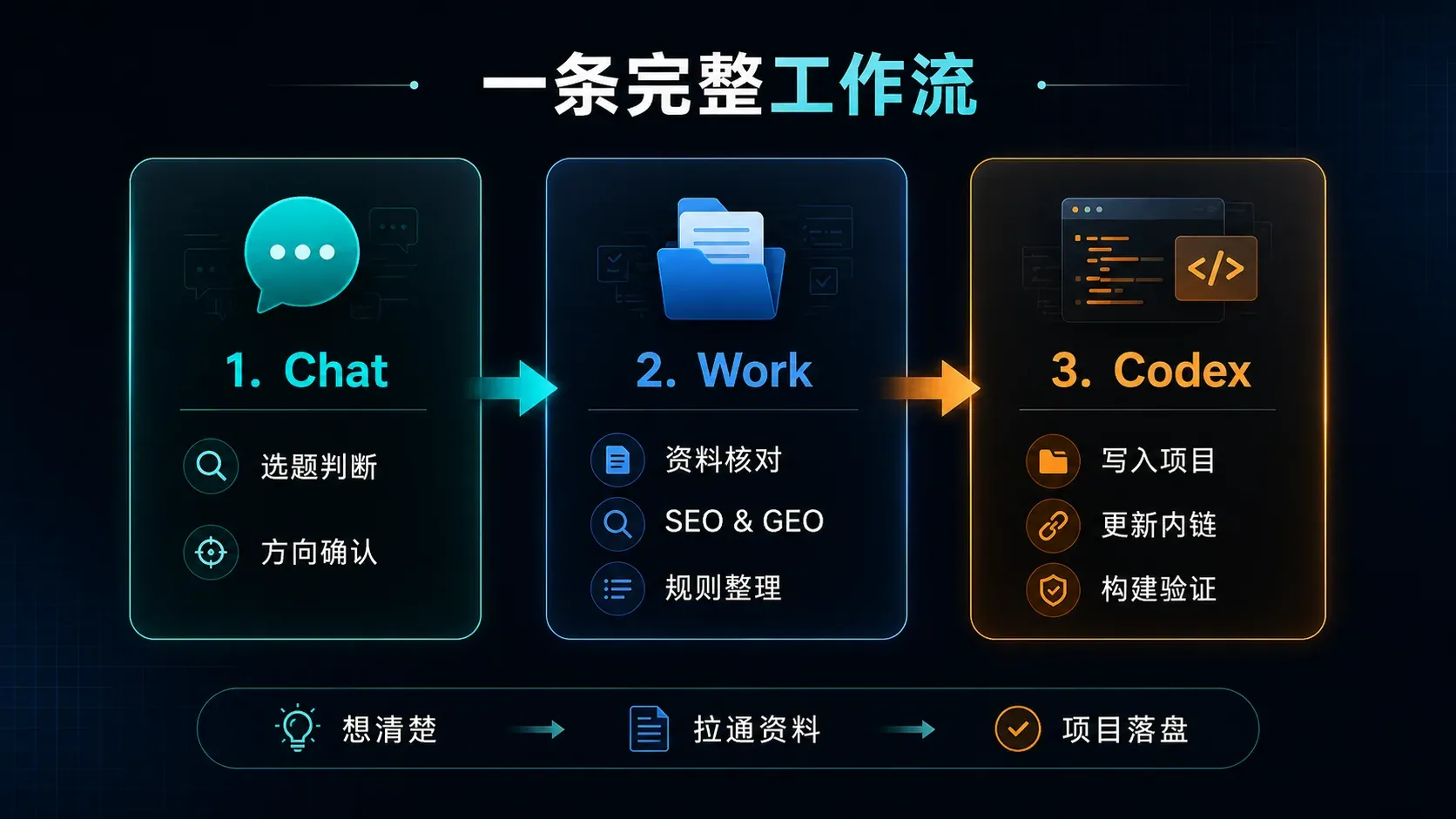
It looked smooth on paper, but it wasn’t.
The first draft of this article was only 1499 words long. The build succeeded, type checking returned zero errors, page routes generated correctly, and Pagefind indexed it. Technically, everything was green, but the content was clearly subpar. XBSTACK’s official articles must be at least 3000 words long. The first draft read more like an elongated product description card and couldn’t support the title “Real-World Workflow Test.”
This failure actually clarified one issue: An AI Agent can complete the task it understands, but that doesn’t mean it understands your actual standards.
How It Started With “Three Days Without an Update”
Not publishing an article for three days isn’t a search engine disaster. The real trouble is that humans tend to use that gap as an excuse to procrastinate further—thinking “I’ll wait a bit longer” today, then “not enough material” tomorrow. Before you know it, the column homepage still shows the same article from three days ago.
I had three options at the time.
One was to publish a short filler post just to keep the dates going. That would be the easiest but also the least valuable. Another was to immediately switch to the Investment, Reading, or Outdoor columns to avoid having too much AI-focused content. The third option was to continue writing about the GPT5.6 Real-World Project Test from three days ago, but not by repeating the model release news.
I chose the third option.
The GPT5.6 article already covered model capabilities, project modifications, content creation, and data analysis. If I continued writing “What are the new features of GPT5.6,” the search terms might look different, but readers would get the same old dish. What hadn’t been fully explored yet was how regular users and independent developers actually divide tasks now that the new ChatGPT desktop app brings Chat, Work, and Codex together under one roof.
This question didn’t come out of nowhere. Over the past few days, I’ve been switching between these entry points myself: sometimes just discussing a headline, sometimes looking up official documentation, and sometimes opening the project to edit files. As the interface becomes more unified, the boundaries of use become blurrier.
What Is the Difference Between Chat and Work in ChatGPT? Chat Decides First
My original prompt to Chat was very short:
Check how the website should operate today; it hasn’t published anything in 3 days.
Taken literally, the simplest answer would obviously be “publish something today.” But operations aren’t about clocking in. Chat’s most important role at this stage was to determine whether what’s missing is simply content volume, or if it’s a piece that can sustain the traffic from the previous post.
We published the GPT5.6 test three days ago, and AI Tools Lab is currently a key focus for development. Continuing to write about ChatGPT today, provided the angle changes, creates a natural thematic connection. Conversely, forcing a pivot to a completely unrelated topic might make the column look more balanced, but it would break the emerging search continuity.
So, during the Chat phase, no body text was written, and no project files were touched. It did only one thing: turning “catching up on homework” into “building on momentum.”
I’m increasingly willing to put Chat at the forefront of any task. Not because it’s the most powerful, but because its startup cost is low. Whether a headline is worth writing, whether a feature should be built, or whether a redesign is a technical or operational issue—talking it through for ten minutes often saves hours of ineffective execution later on.
Its shortcomings are also obvious. Standard conversations are great for quick judgment but not for maintaining stable context across dozens of files, multiple web pages, and long-term rules. It can give you direction, but if you ask it to simultaneously verify official releases, site inventory, Frontmatter, internal links, build processes, and existing uncommitted changes, the task quickly becomes unwieldy.
What Is ChatGPT Work Best For? The Hard Part Is Conflicting Context
OpenAI introduced ChatGPT Work on July 9, 2026. The current official boundary is clearer than “a longer chat”: Chat handles fast conversational help, search, and brainstorming; Work handles research, analysis, and finished documents, spreadsheets, presentations, reports, or Sites; Codex remains focused on local folders, repositories, terminals, tests, and software delivery. On desktop, Chat and Work live in the ChatGPT view, while Codex remains a separate view with separate history. Work is available on eligible web, mobile, and desktop plans, but only desktop Work can directly use local files and desktop apps after permission is granted. See the official ChatGPT Work and Codex comparison and Codex usage guide.
As of August 14, the official help page also makes several edge cases explicit: cloud Work chats can continue across web, mobile, and desktop, while local desktop chats stay on that computer; Codex is still not a selectable web or mobile experience, although supported desktop Codex conversations can be reached from the mobile Remote tab; and eligible desktop accounts can use Voice with Work or Codex. Those product surfaces are converging, but the routing rule is still the same: Work is centered on completing work; Codex is centered on software engineering.
The amount of material I had to review during this Work phase wasn’t huge, but it was scattered.
It needed to cross-reference src/content/ai/gpt56-test.md from three days ago to confirm the new article wouldn’t duplicate existing content; check src/content/config.ts to know which fields are allowed in the AI content collection; and look at src/pages/ai/tools-lab.astro to see how articles enter sections and where current featured slots point. SEO, GEO, FAQs, JSON-LD, Canonical tags, and image paths aren’t things you can just tack onto the end of an article after it’s written.
The desktop fan hummed steadily nearby. The browser had the OpenAI official page open, while the project itself contained a pile of legacy specifications. What was truly frustrating wasn’t a lack of resources, but the fact that they contradicted each other.
The headline needed to cover “the difference between ChatGPT Work and Codex,” but the body text couldn’t repeat the keyword a dozen times. GEO requires queries, tldr, FAQs, and entity relationships, yet ordinary readers shouldn’t encounter a block of machine-query keywords at the start of the article. The cover image needs 2.35:1, but the article shouldn’t have to generate a whole set of promotional posters just for illustration. More critically, the old writing prompt in the project still says “1500 words or more,” whereas the actual site rule I follow requires formal articles to be at least 3000 words.
Work can pull all these materials together, but it doesn’t inherently know which rule is updated or more important. As long as old files remain, it might very diligently execute an expired standard.
This is my genuine assessment of Work: it excels at bridging context, but that doesn’t mean it automatically holds final decision-making power. The more data there is, the more someone needs to tell it which rules are current and which are just historical leftovers.
For content structure, I still keep only one normal body section. queries, tldr, FAQs, and JSON-LD go into the Frontmatter, avoiding duplicate display via hideStructuredBlocks: true. Readers see the article, while search engines and generative search systems read the structured information—the two sides don’t pollute each other.
ChatGPT Work vs Codex: Codex Is the Repository-Focused Environment
Discussion and organization won’t break the website. Codex will.
When opening the workspace, the repository wasn’t clean to begin with. Several reports files already had modifications, and the xbstack-org-meta submodule was also in a changed state. None of this was generated by the current task. If the agent doesn’t check the workspace status first and accidentally formats, overwrites, or commits everything together, it becomes difficult later to distinguish which changes belong to this specific article.
So Codex’s first step isn’t writing—it’s confirming boundaries.
The scope of actual additions and modifications this time covers only four areas: creating a new article src/content/ai/chatgpt-work-chat-codex-difference.md; replacing the cover with a 1923×818 PNG generated by GPT; moving the “Current Feature” section of the AI Tools Lab to the new article; and returning to the GPT5.6 real-world test article to add a backlink. Not a single original report file or submodule was touched.
It first needs to read the existing article format. The XBSTACK Tools Lab isn’t just about tossing any Markdown into src/content/ai and calling it done. series, subcategory, tool_name, test_type, scenario, recommendation, and evidenceStatus all affect archiving and page display. If the Canonical path has even one wrong slash, or if the image path goes up one level too many, the article might still build successfully but leave behind duplicate pages or orphaned resources 404 after publishing.
Once the body is written, the article also links back to the Claude Sonnet 5 Astro optimization test, the AI SDK 7 production migration test, the MCP, Function Calling, and API Gateway architecture guide, the content-quality audit Builder Log, and UTM distribution tracking. These links connect model use, engineering execution, human acceptance, and content distribution instead of merely satisfying a link-count rule.
Finishing the file edits isn’t enough; next comes the build process.
npm run check checked 352 files, resulting in 0 errors, 0 warnings, and 0 hints. npm run build successfully generated the new route:
/ai/tools-lab/chatgpt-work-chat-codex-difference/
The sitemap generated successfully, and Pagefind ultimately indexed 178 static pages.
These numbers look great. Yet the first version was still rejected.
Build passed green, so why did the first version fail?
The body of the first draft contained only 1499 words.

This wasn’t a fluke. The old prompt specified a minimum of 1500 words, while earlier instructions explicitly forbade writing lengthy six- or seven-thousand-word reviews. Consequently, the agent naturally kept the word count hovering around 1500 words. It even executed this with impressive precision: stripping out repetitive explanations while preserving tables, FAQs, internal links, and official documentation, stopping almost exactly at that outdated benchmark.
That is precisely the problem.
From a machine’s perspective, it performed flawlessly. The word count matched the rules it read, the Markdown parsed correctly, the Schema had fields, the build succeeded, routes existed, and type checking returned zero errors. But from a content perspective, it failed to thoroughly explain the real differences between Chat, Work, and Codex. It also missed the most critical friction points in this workflow: conflicting old rules, existing dirty files, permission boundaries, the initial rejection, and the manual rework that followed.
Readers don’t just want three definitions. They want to know when to switch contexts, what happens if you switch incorrectly, whether Work will replace Codex, why Codex can’t unilaterally dictate content direction, and why a successful build doesn’t automatically mean the content is ready for publication.
1499 words are enough to list answers, but not enough to explain the process.
I subsequently updated the word count rules in src/prompts/WRITING_RULES_V4.1.md: official site articles must be no fewer than 3000 words; technical tests, tutorials, and deep-dive retrospectives should ideally be controlled within the 3000–5000 word range; anything under 3000 words counts only as dynamic updates, briefs, or explicitly labeled short-form content.
This modification was more important than rewriting the current article. Fixing just one piece means the next one will inevitably collide with the old rules again. By baking the error correction back into the specifications, the system actually changed.
This was the most valuable part of this test: automated acceptance checks whether files are broken, while human acceptance determines whether the output is actually usable.
Should You Use ChatGPT Work or Codex for Coding? Follow the Bottleneck
My criteria are quite basic: where exactly is the bottleneck right now?
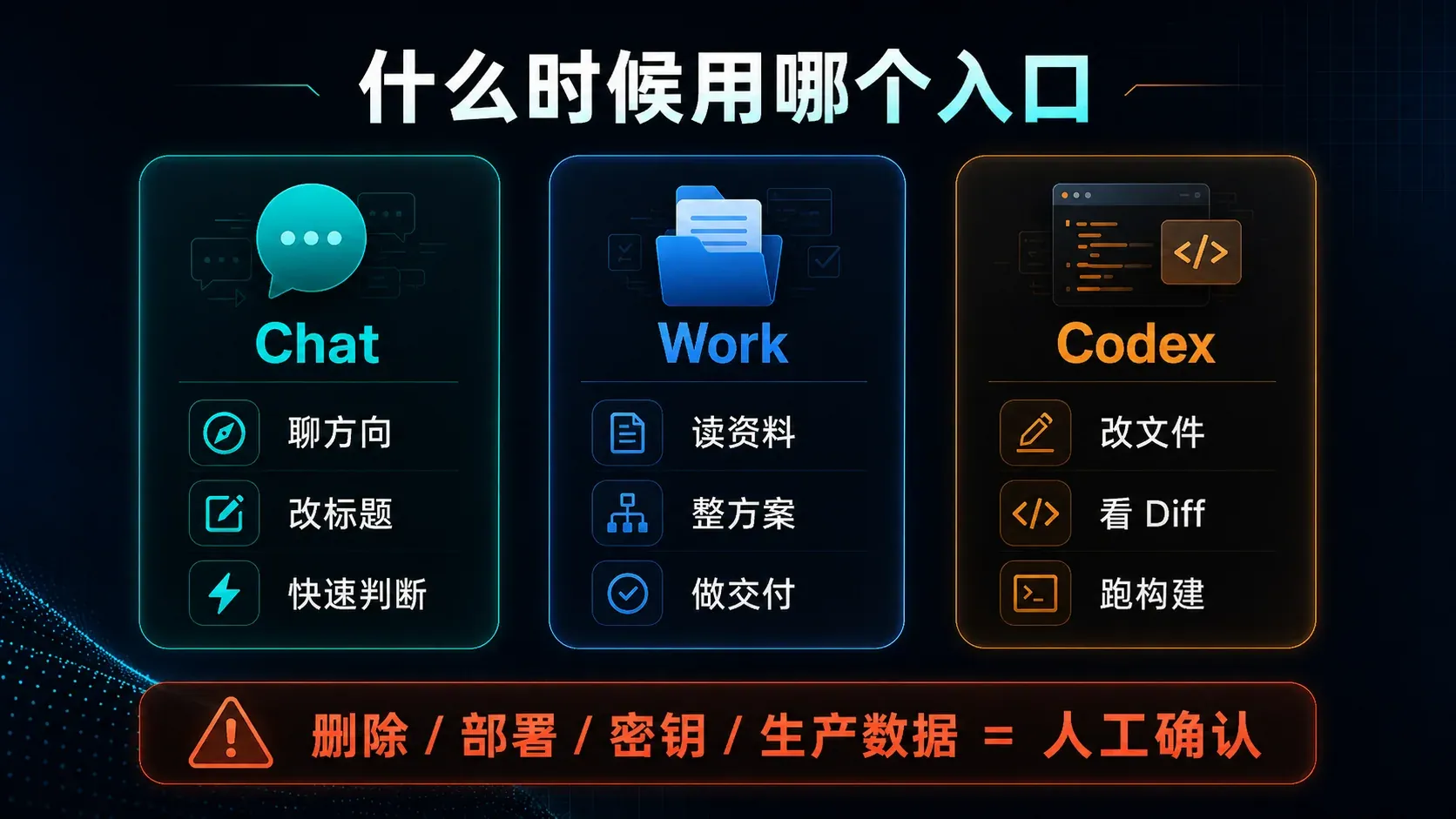
If things aren’t clear yet, use Chat. Should the title change? Should we publish today? Is a specific feature worth building? Discuss these for a few rounds first. Many people say “help me write an article,” but what they’re really missing isn’t text—it’s clarity on whether the article is even worth writing in the first place. At this stage, mobilizing a bunch of files and tools only serves to accelerate mistakes down the wrong path.
When there’s already plenty of data, but it’s scattered across web pages, documentation, emails, spreadsheets, and historical records, use Work. Website operations retrospectives, product launch reviews, and daily market briefs all fall into this category. The downside is that it tends to over-deliver: if the goal is vague, it proactively expands the scope, eventually delivering a massive package that looks complete but is practically useless. Therefore, you must clearly define the final deliverable, prohibited actions, available resources, and the conditions under which it should stop and ask a human for guidance.
When you need to take responsibility for the code repository, switch to Codex. Did the page generate? Are there type errors? Did the tests pass? Which files were actually modified? These are verifiable outcomes. Codex excels at work that produces evidence; it shouldn’t be deciding what the website writes about today. If the direction is wrong, the build can still turn green. Conversely, even if the answer is correct, without saving to disk, generating a diff, or triggering a build, it remains nothing more than a suggestion.
How Should Indie Developers Combine Chat, Work, and Codex?
For similar tasks going forward, I’ll first compress the objective into a single, verifiable sentence in Chat. Not “manage the website,” but “publish one unique article today that leverages GPT5.6 and completes internal routing.” The objective must also include boundaries: no consecutive posts, no homepage restructuring, no touching existing uncommitted files, and no automatic deployment.
Once the direction is set, have Work consolidate the materials. Keep official facts separate from personal testing, current rules separate from historical ones, and already-published content separate from what’s planned. More data isn’t always better; only keep what proves your conclusion.
Then hand off the clearly defined scope to Codex. Have it read the files first, then present a plan; modify only the specified paths; review the Diff upon completion; run npm run check and npm run build; explicitly state any unverified parts—don’t pass off “it should be fine” as a result.
But we’re not done yet. You must return to manual review.
I check at least five things: Does the title deliver on its promise? Is the body all conclusion with no process? Do the so-called real-world experiences have concrete evidence? Do word count and pacing comply with site guidelines? And does SEO/GEO inadvertently harm readability?
The issue with the first version of 1499 was caught right here. All previous automated checks passed; they simply couldn’t detect that “this piece is too thin.”
Another non-negotiable factor: permissions
Risks in Chat usually stay at the response level. But once Work and Codex are integrated into applications, files, and repositories, risks become actions.
Deleting files, deploying code, reading secrets, modifying cloud resources, writing to production databases, or replacing payment/email configurations shouldn’t be granted by default just because an Agent looks smart. The safer approach remains least privilege: start with read-only access, grant write permissions directory-by-directory when needed, require separate confirmation for deletions and overwrites, enforce final approval for deployments and production writes, and verify the Diff, logs, and rollback points afterward.
There’s also a practical issue: don’t dump simple tasks onto Work. Asking for a headline, tweaking a description, or explaining a concept can be handled by Chat. Complex entry points consume more context and tools, making tasks heavier. Tools shouldn’t be left running just because they’re advanced.
What actually stuck this time
Chat, Work, and Codex aren’t three competing buttons, nor are they “low, mid, high” tiers. They solve different problems along the task chain.
Chat reduces directional errors before you start; Work organizes scattered context into deliverable results; Codex performs verifiable modifications on actual repositories. The most stable setup isn’t picking one tool and sticking with it, but letting them relay at the right positions.
This article itself serves as somewhat ungraceful proof. The initial direction assessment was correct, material verification was fine, project modifications and builds all passed—but due to outdated word-count rules, it produced a thin 1499-word draft. Without human intervention to reject it, this “finished product” would likely have gone live.
AI can significantly speed up task completion.
Humans remain responsible for deciding: whether the task was done correctly and whether the result meets the standard.
Frequently Asked Questions
What’s the biggest difference between ChatGPT Work and regular Chat?
Regular Chat is better suited for discussions, Q&A, and quick judgments. Work targets longer, multi-step tasks, integrating apps, web pages, and files to organize scattered information into complete deliverables like documents, tables, presentations, or websites. If a task only requires a single-sentence answer, there’s no need to specifically use Work.
What’s the difference between ChatGPT Work and Codex?
Work has a broader boundary, focusing on cross-document and cross-application workflows; Codex is more focused on code repositories and engineering execution, suitable for reading projects, modifying files, reviewing Diffs, running tests, and building. A real-world task often involves Work organizing first, followed by Codex implementing.
Is Codex Still a Separate View in the ChatGPT Desktop App?
Yes. Chat and Work live in the ChatGPT view, while Codex remains a separate desktop-app view with history that is separate from ChatGPT history. Codex continues to focus on local folders, repositories, terminals, diffs, tests, and software delivery, so Work does not replace it.
Is it necessary for average users to use Work?
Not for occasional questions. Work becomes valuable when continuously reading multiple files, organizing long-term materials, creating formal deliverables, or executing repetitive workflows. The simpler the task, the more direct Chat usually is.
Is Codex suitable for directly operating production environments?
It is not advisable to take over directly without approval. A more robust approach is to default to read-only access, restrict directories, grant permissions incrementally, review diffs, run tests, and maintain rollback points. Deployment, secrets, cloud resources, and production data writes must be manually confirmed.
Does a successful Astro build mean the article is ready to publish?
Not necessarily. Builds and type checks can catch formatting, routing, and code issues, but they cannot determine if an article is too thin, lacks real details, or if the title fails to deliver on its promise. The first draft of this article passed all technical checks but was still rejected for being only 1499 words long.
What is the most practical combination for indie developers?
Use Chat to set the direction, Work to gather materials, Codex to write and verify, and then have a human perform the final review. This article is the result of that workflow. We will further observe its impact on search, internal linking, and distribution data through the AI Tools Lab and Growth Lab, rather than just looking at whether the article was successfully generated. Another useful comparison is the Kimi K3 cross-file analysis test: it understood the project relationships quickly, but its first final recommendation still had to be overturned through human counter-evidence.
Continue from one agent pattern to the complete production system
The AI Agent hub organizes architecture, memory, tool use, evaluation, security, deployment and multi-agent coordination into a single learning path.
Next step: continue the Agent system
Full decision path →Choose the next architecture, tool, memory, evaluation, security, or production decision instead of starting over.

DISCUSSION
Questions, verification and corrections
Sign in to comment. Every new comment is reviewed before publication; while pending, it is visible only to you and the administrator.