

n8n Code Node 'Task request timed out': Fix 'Not Matched to a Runner'
n8n Code Node reports Task request timed out / not matched to a runner. Reproduce it on 2.37.1, distinguish runner wait from JavaScript timeout; troubleshoot Cloud vs self-hosted.
Evidence 12 cited sources
On this page
If an n8n Code node is not throwing a JavaScript syntax error but instead waits for roughly a minute and then fails with:
Task request timed out
Your Code node task was not matched to a runner within the timeout period
do not start by rewriting the return statement, loops, or input data. This error first means the Code task was not accepted by a matching Task Runner before the N8N_RUNNERS_TASK_REQUEST_TIMEOUT deadline. XBSTACK reproduced the exact path with official n8nio/n8n:2.37.1 and n8nio/runners:2.37.1 images in external mode: remove the runner and a one-line Code node times out; register the JavaScript runner and the same workflow passes; start the runner after the request is already waiting but before the deadline and the pending task is accepted without a manual retry. For self-hosted n8n, inspect runner registration, broker reachability, auth, image versions, worker placement and capacity. For n8n Cloud, use a minimal Code canary to separate platform runner failure from business logic, then take the execution evidence to n8n Support. Increasing the request timeout only extends the waiting window; it does not repair a runner that never becomes available.
What the error actually means: this is not ordinary JavaScript execution timeout
n8n’s current Task Runner architecture has three relevant roles:
Code node / task requester
          ↓
      task broker
          ↓
 available task runner
          ↓
   execute JavaScript
The official docs describe runners connecting to the broker over WebSocket. The Code node is the task requester: it submits a task to the broker, and an available runner accepts and executes it. If no matching runner accepts the request before the deadline, the requester receives Task request timed out.
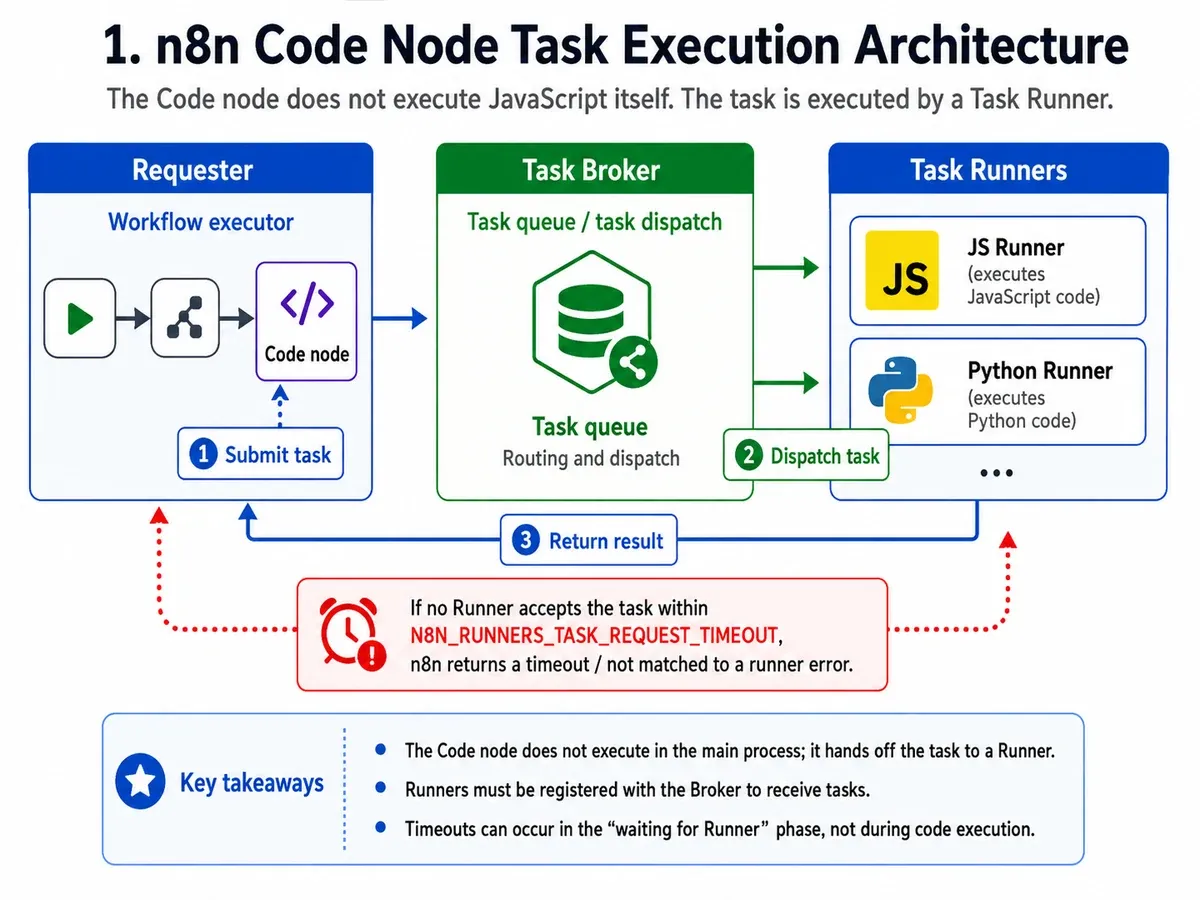
That is a different phase from “the runner accepted my task and the JavaScript itself ran too long.”
Two current environment variables are easy to confuse:
| Setting | Current documented default | What it limits |
|---|---|---|
N8N_RUNNERS_TASK_REQUEST_TIMEOUT | 60 seconds | How long a task request may wait for an available runner |
N8N_RUNNERS_TASK_TIMEOUT | 300 seconds | How long an accepted task may execute before the runner stops it |
If the error explicitly says:
was not matched to a runner within the timeout period
your first question should be why no runner accepted the task, not how to make the JavaScript faster.
XBSTACK reproduction: no runner, healthy runner, and recovery while waiting
To remove workflow complexity and Cloud-specific internals from the test, I used official Docker images on a Linux x86_64 NAS:
- Docker
28.5.2; n8nio/n8n:2.37.1;n8nio/runners:2.37.1;- external runner mode;
- default SQLite;
- no credentials;
- no external APIs;
- only
Manual Trigger -> Code.
The Code node contains one statement:
return [{ json: { ok: true, source: 'xbstack-task-runner-repro' } }];
For the negative control, I shortened N8N_RUNNERS_TASK_REQUEST_TIMEOUT from the current documented default of 60 seconds to 15 seconds so the failure would not take a full minute each run. The mechanism stays the same.
Control 1: external mode with no matching runner
Result: failure after about 15.04 seconds.
n8n logs:
n8n Task Broker ready on 0.0.0.0, port 5679
Task request timed out
Error: Task request timed out
The execution description says:
Your Code node task was not matched to a runner within the timeout period
(waited 15 seconds).
This indicates that the task runner is currently down, or not ready,
or at capacity, so it cannot service your task.
The Minimal Code execution time was about 15040 ms. That does not mean the one-line JavaScript consumed 15 seconds of CPU. It means the task spent the window waiting for a JavaScript runner that never accepted it.
Control 2: matching JavaScript runner registers normally
With n8nio/runners:2.37.1 attached as the external sidecar, the n8n log records:
Registered runner "launcher-javascript"
Registered runner "JS Task Runner"
The same Code node then returns:
{
  "ok": true,
  "source": "xbstack-task-runner-repro"
}
Control 3: request starts first, runner starts before the deadline
This third run is the clearest demonstration of what the request timeout means.
I started the n8n CLI execution first, letting the Code task wait at the broker with no runner container active. Then I started the matching n8nio/runners:2.37.1 sidecar before the 15-second deadline.
The workflow did not need a manual retry. After the JS runner registered, the already-pending task was accepted and the workflow completed after about 8.42 seconds.
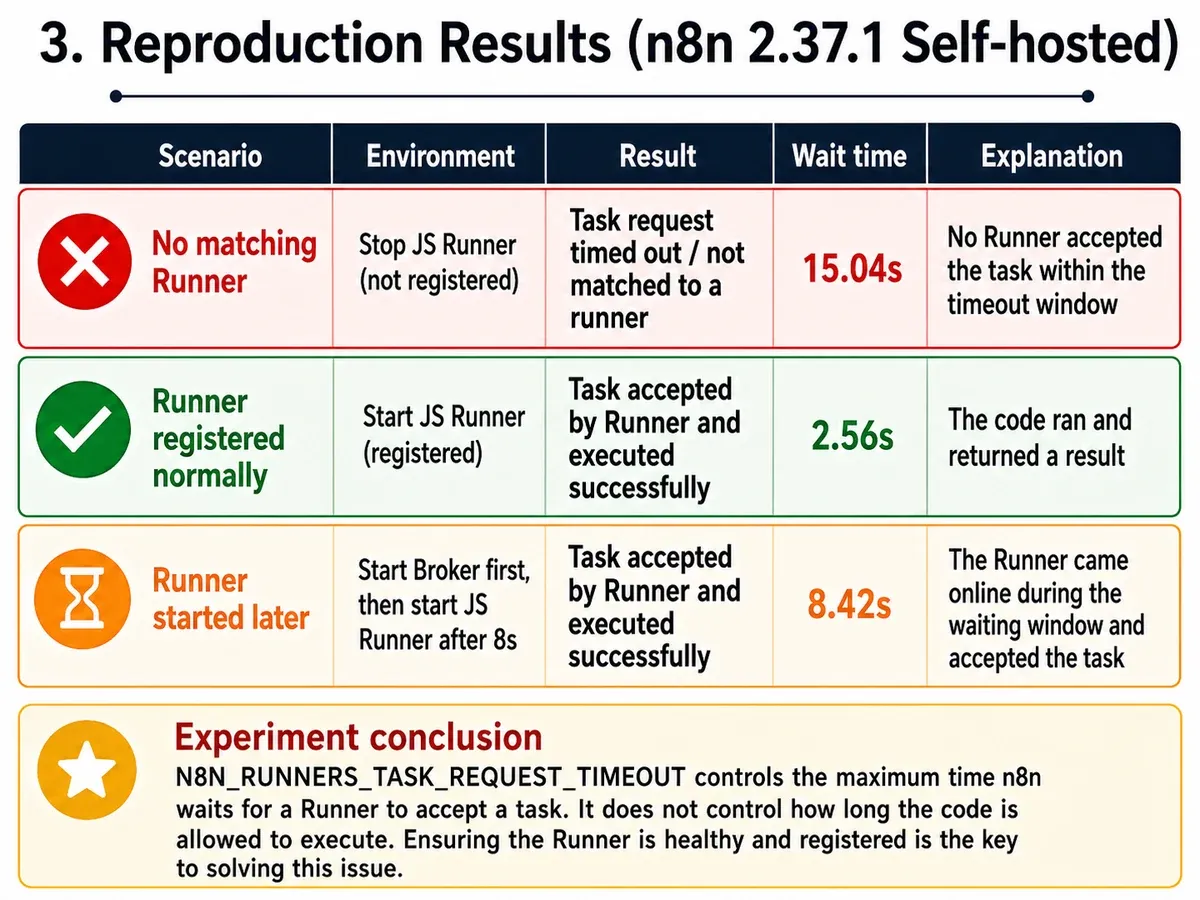
The operational takeaway is straightforward:
N8N_RUNNERS_TASK_REQUEST_TIMEOUTis the “how long am I willing to wait for a runner?” window, not the “how long may my JavaScript execute?” limit.
The minimal workflow, sanitized logs and version matrix are stored in the XBSTACK reproduction asset for this issue cluster.
Fastest diagnosis: create one tiny Code canary first
If the failing workflow has dozens of nodes, agents, APIs and database writes, do not debug all of that at once.
Create:
Manual Trigger
  ↓
Code
Use:
return [{ json: { ok: true } }];
Then branch the diagnosis.
Case A: the minimal Code node fails with the same runner timeout
Business logic, model API keys and input payloads are no longer your first suspects. Check:
- is the runner actually running;
- did it successfully register with the broker;
- is a JavaScript runner available, not only Python;
- can the runner container reach the broker;
- do both sides use the same auth token;
- are all runner concurrency slots occupied;
- which worker received the execution, and does that worker have its own sidecar.
Case B: the minimal Code node succeeds, but one workflow still fails
Do not force every failure into the infrastructure bucket. Continue with:
- genuinely long-running Code;
- infinite loops or CPU-heavy synchronous work;
- very large inputs;
- modules missing from or not allowlisted in the runner image;
- a trigger-specific dispatch difference between Schedule, Webhook and Manual runs.
That final case matters because n8n #37065 is narrower than the generic timeout reproduced here: the report says the external runner is healthy, webhook/manual JavaScript runs pass, but scheduled JavaScript is not dispatched. That is a trigger-path/dispatch difference, not proof that every runner timeout is caused by a missing sidecar.
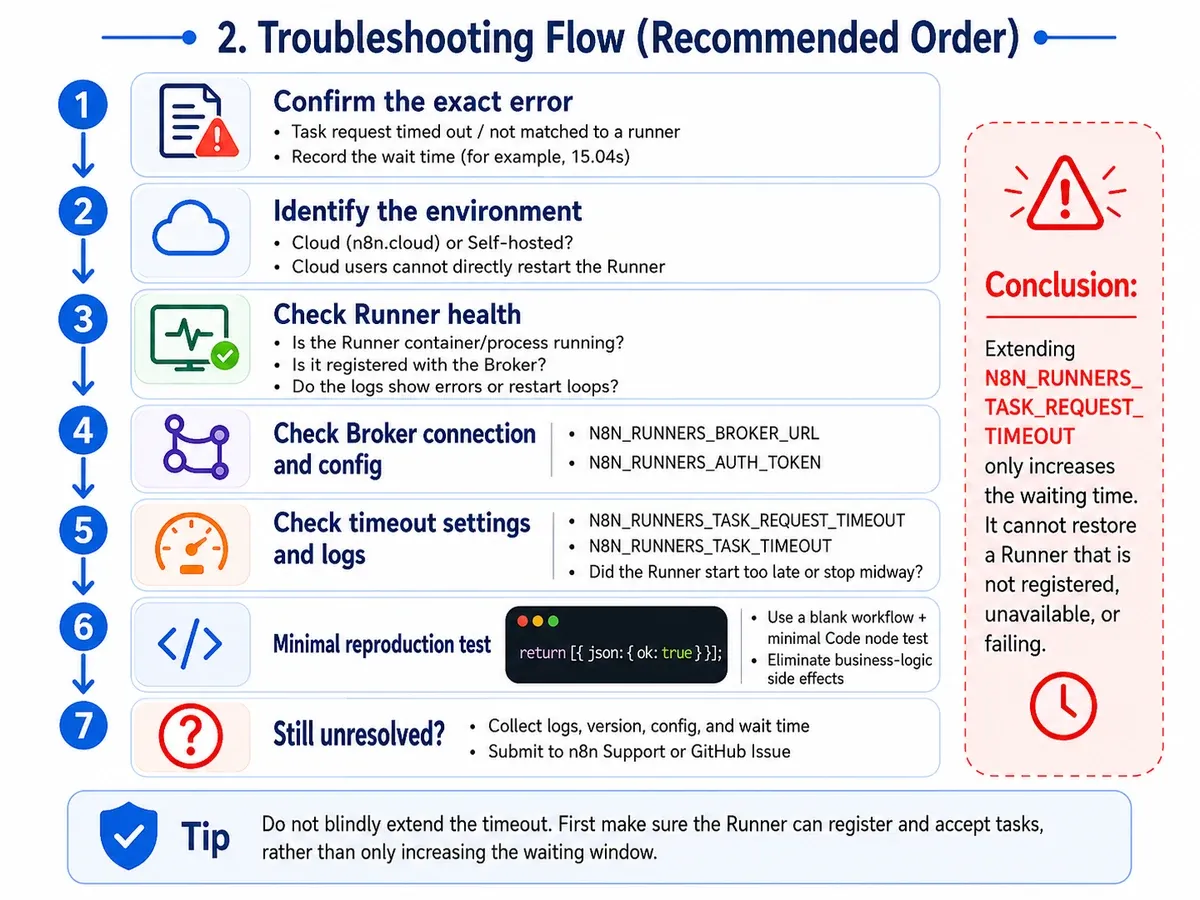
Self-hosted n8n: check these in order before changing the timeout
1. Confirm internal vs external runner mode
n8n currently recommends external mode for production so n8nio/runners runs as an isolated sidecar.
A minimal n8n-side configuration includes:
environment:
  N8N_RUNNERS_MODE: external
  N8N_RUNNERS_BROKER_LISTEN_ADDRESS: 0.0.0.0
  N8N_RUNNERS_AUTH_TOKEN: your-shared-secret
Runner sidecar:
environment:
  N8N_RUNNERS_TASK_BROKER_URI: http://n8n:5679
  N8N_RUNNERS_AUTH_TOKEN: your-shared-secret
One easy miss: the broker listens on localhost by default. In a multi-container setup, the official docs call out N8N_RUNNERS_BROKER_LISTEN_ADDRESS=0.0.0.0 so the sidecar can reach it.
2. Match the n8n and runners image versions
The external-runner documentation explicitly says the n8nio/runners image version must match the n8nio/n8n version.
For example:
n8nio/n8n:2.37.1
n8nio/runners:2.37.1
Do not upgrade the main container and leave the sidecar pinned to an unrelated tag, then start editing the workflow first.
3. Look for runner registration, not only docker ps = Up
A sidecar container being Up proves only that the container process exists. It does not prove the JavaScript task runner has joined the broker.
Useful log lines look like:
Registered runner "launcher-javascript"
Registered runner "JS Task Runner"
In the healthy control, n8n briefly saw only a Python offer while the pending task required JavaScript:
No matching task offer ... (type "javascript"). Available offer types: [python]
The task proceeded only after the JS runner registered.
4. Verify auth and broker reachability
The n8n container and the runners container must share the same:
N8N_RUNNERS_AUTH_TOKEN
The runner also needs a reachable:
N8N_RUNNERS_TASK_BROKER_URI
In Docker Compose that usually means a service name, for example:
http://n8n:5679
Do not blindly use localhost:5679 from a separate sidecar. Inside that container, localhost points back to the runner container itself.
5. In Queue Mode, every execution worker needs its own sidecar
The official docs state that each worker needs a Task Runner sidecar in Queue Mode.
If manual executions pass but production executions fail, ask:
Did both executions run on the same n8n process/worker?
If OFFLOAD_MANUAL_EXECUTIONS_TO_WORKERS=false, the main instance can execute manual runs itself, so the main instance also needs an appropriate sidecar.
6. Check capacity before assuming the runner crashed
The current documented default for N8N_RUNNERS_MAX_CONCURRENCY is 5. If all runner slots are busy with long tasks, a new request can sit at the broker until its request timeout expires and produce the same high-level message.
So the same error can reflect:
- runner container not started;
- runner started but never registered;
- auth/network prevents broker connection;
- no matching JavaScript/Python runner type;
- runner capacity is exhausted;
- one worker lacks a sidecar;
- a runner process repeatedly crashes during startup.
The message tells you the task was not accepted in time. It does not, by itself, tell you why.
Why changing 60 seconds to 300 seconds is not the first fix
n8n’s own error text points to:
N8N_RUNNERS_TASK_REQUEST_TIMEOUT
That can be appropriate when you already know the runners eventually become available but need more time because of cold start or short-lived saturation.
It is not a root-cause fix for:
runner container down
AUTH_TOKEN mismatch
wrong broker URI
broker bound only to localhost
JS runner crashes during startup
worker has no sidecar
In those cases:
60s -> 300s
only turns “fail after one minute” into “fail after five minutes.” It can also mislead operators into thinking the workflow is actively executing when the Code task has not even been accepted yet.
n8n Cloud: do not copy self-hosted Docker commands
Several Cloud reports appeared on August 25-26, 2026:
- #37069: n8n Cloud 2.37.1; even a blank workflow with a minimal Code node cannot get a runner;
- #37062: similar 2.37.1 Cloud symptom with additional users reporting the same behavior;
- #37043: JavaScript Code node timeout with a Cloud 2.37.1 confirmation in comments;
- #36989: the same high-level timeout was also reported on Cloud 2.35.4.
That is enough to justify investigating the search problem, but not enough to title the article “n8n 2.37.1 confirmed regression.”
On August 25, GitHub releases showed the stable tag at 2.36.7 and the beta tag at 2.37.1. Issue #37064 proposed a 2.37.x / Node 26 runner-image regression hypothesis, but a maintainer closed the issue and said they were not seeing the same behavior on their own Cloud or self-hosted instances. There is no official evidence yet that every 2.37.1 instance shares one root cause.
For Cloud, the highest-value workflow is:
- create
Manual Trigger -> Code; - return only
{ok:true}; - record the n8n version;
- record the
waited 60/66 secondsdetail; - preserve Execution / Debug Info;
- if the canary fails too, send that evidence to n8n Support.
You cannot directly inspect or restart n8n Cloud’s internal runner sidecar and broker the way a self-hosted operator can.
Is this the same issue as the ARM64 GLIBC_PRIVATE Task Runner failure?
No.
XBSTACK’s existing n8n 2.33.7 distroless ARM64 GLIBC_PRIVATE reproduction covers a different failure boundary: the Python runner process exits immediately with code 127 and a libc symbol lookup error.
This article covers:
Code task submitted
↓
waiting for matching runner
↓
not accepted before deadline
↓
Task request timed out
A runner-process crash can be one reason no runner becomes available, but the high-level not matched to a runner error does not imply GLIBC or ARM64 by itself.
For the full deployment baseline, see Self-hosted n8n: Docker Compose, Postgres, VPS and NAS production setup. If the runner accepts the task and the node itself fails, retries, or needs centralized failure handling, see n8n Error Handling: Error Workflow, Retry On Fail, timeouts and reruns.
Practical checklist
When you see:
Task request timed out
Your Code node task was not matched to a runner within the timeout period
work through this order:
- reduce to
Manual Trigger -> Code; - determine whether every Code node fails;
- self-hosted: confirm internal vs external runner mode;
- verify the matching JS/Python runner actually registers;
- confirm n8n and runners image tags match;
- compare
N8N_RUNNERS_AUTH_TOKENon both sides; - verify
N8N_RUNNERS_TASK_BROKER_URIand broker listen address; - in Queue Mode, confirm the execution’s worker has its own sidecar;
- check concurrency and long-running tasks;
- only then decide whether a larger request timeout is justified;
- on Cloud, if the minimal canary still fails, escalate with evidence instead of rewriting JavaScript.
Fix status: there is no universal “upgrade to this version” answer yet
As of 2026-08-26, this error string describes a symptom boundary, not one single upstream bug ID.
The recent Cloud cluster is worth monitoring, but the available evidence does not support either of these shortcuts:
all 2.37.1 instances = one Task Runner regression
or:
increase the request timeout = fixed
A better production control is a tiny Code canary plus explicit checks for runner registration, broker reachability and runner capacity after deployment. That makes the next occurrence much easier to classify as platform-instance trouble, runner infrastructure trouble, or a workflow/trigger-specific problem.
References and reproduction assets
Official references:
Recent upstream reports:
The complete minimal workflow, no-runner log, healthy-runner control, start-while-waiting recovery control, and version matrix are public in the XBSTACK n8n Code Node Task Runner timeout reproduction repository. The source project also keeps the same assets under experiments/n8n-code-node-task-runner-timeout-repro/ for future version regression runs.
Continue through the production automation path
The workflow hub connects self-hosting, queue mode, webhooks, retries, observability and n8n implementation cases into one production-oriented learning path.
Next step: make the workflow operable
Full decision path →Continue with retries, queues, idempotency, observability, or cost controls that keep the workflow reliable.

DISCUSSION
Questions, verification and corrections
Sign in to comment. Every new comment is reviewed before publication; while pending, it is visible only to you and the administrator.