

n8n Execution Stuck Running After Success: Zombie Execution When Successful Runs Are Not Saved
n8n execution stuck running after success? On 2.36.6, a webhook can return 200 while execution_entity stays running. This A/B reproduces the cause and workaround.
Evidence 3 cited sources
On this page
If your n8n production webhook already returned HTTP 200 and the business action finished, but the corresponding database row still looks like this long afterward:
finished = false
status = running
stoppedAt = NULL
do not assume the node is still executing or the Task Runner is hung. I reproduced a much narrower failure on the official n8nio/n8n:2.36.6 image: same instance, same SQLite database, same three-node Webhook → Set → No Operation workflow, with only Save successful production executions changed.
With Do not Save (saveDataSuccessExecution=none), the production webhook returned 200 but execution_entity kept finished=0 / status=running / stoppedAt=NULL. In the control, changing only the setting to Save (all) produced finished=1 / status=success and a normal stoppedAt timestamp.
n8n’s upstream issue #37040, opened on August 25, 2026, reports the same symptom on n8n 2.36.6 + PostgreSQL + regular execution mode. At publication time the issue is still open, marked status:in-linear, with no linked fix PR. This is therefore not enough evidence to blame SQLite or PostgreSQL alone, and it is also not evidence that every execution stuck in running is this bug.
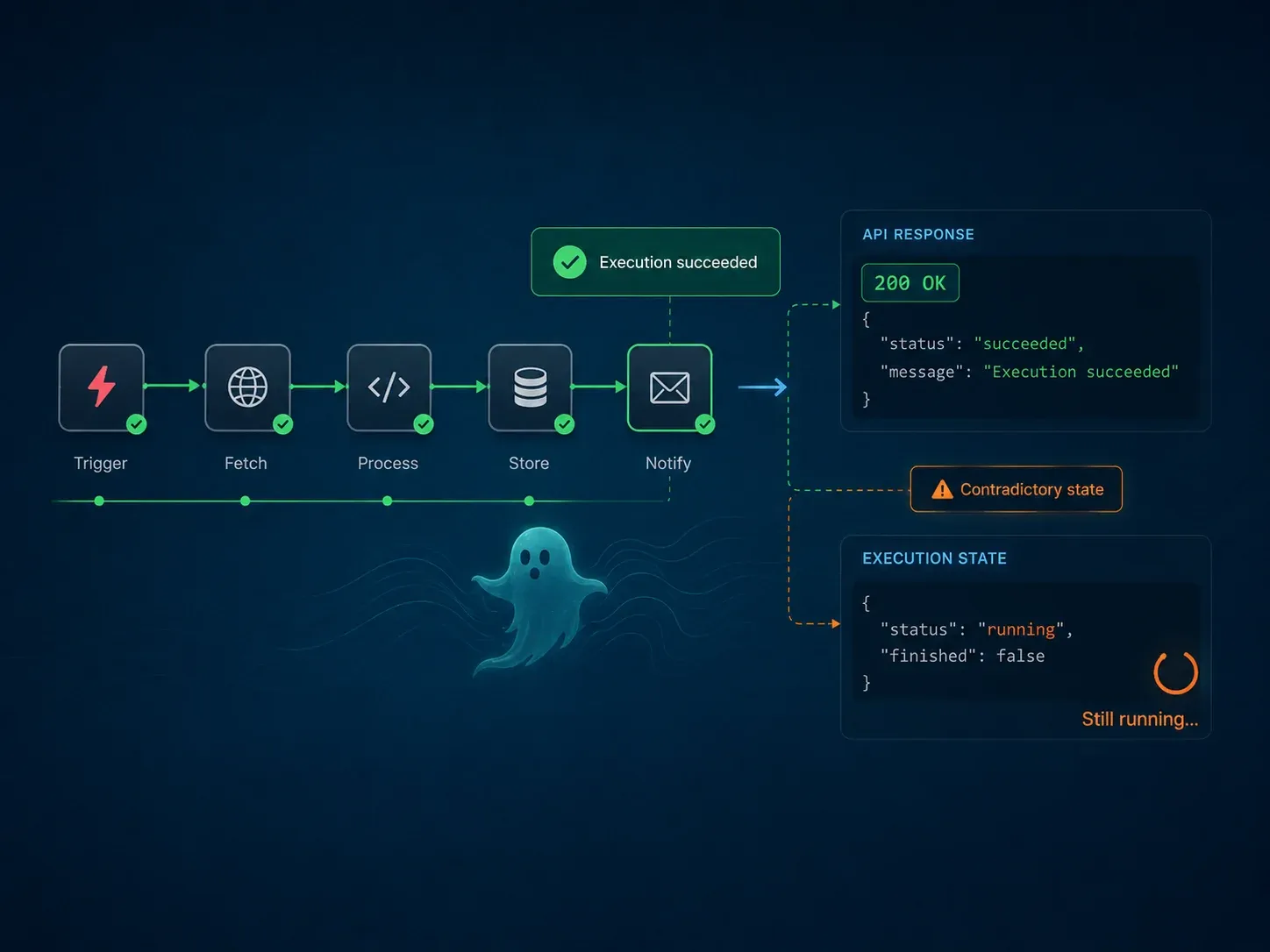
Check whether you have this specific zombie execution
The confusing part is that the workflow looks complete from the caller’s perspective while the database says otherwise. This article is a good match when most of these conditions are true:
- It is a production execution such as a production Webhook.
- The webhook or business action already succeeded rather than a node actually blocking.
- Save successful production executions is set to
Do not Save. - The matching
execution_entityrow showsfinished=false,status=running, and an emptystoppedAt. - Similar successful runs keep accumulating instead of eventually closing as
success.
If runData is empty, the node never starts, a Code node reports Task request timed out, a Schedule Trigger is not dispatching, or a container restart is required before work continues, the search phrase may still be “n8n stuck running” but the failure can be different. Upstream issue #36886, for example, describes a genuinely stuck execution path. The case here is specifically completed work whose persisted final state was not closed.
Minimal reproduction: change one setting
I deliberately avoided AI Agent nodes, external APIs, database nodes, and complex expressions. Both workflows are only:
Production Webhook
      ↓
Set { ok: true }
      ↓
No Operation
They use the same n8n 2.36.6 instance, database and nodes. The only intended variable is:
experiment: saveDataSuccessExecution = none
control:    saveDataSuccessExecution = all
Both production webhooks returned:
HTTP/1.1 200 OK

{"message":"Workflow was started"}
I then queried SQLite directly:
SELECT id,
       workflowId,
       finished,
       status,
       mode,
       startedAt,
       stoppedAt,
       storedAt,
       jsonSizeBytes
FROM execution_entity
ORDER BY id DESC;
The result:
workflowId                 finished  status   stoppedAt
-------------------------  --------  -------  -----------------------
xbstackZombieControl2366   1         success  2026-08-29 02:10:30.826
xbstackZombie2366          0         running  NULL
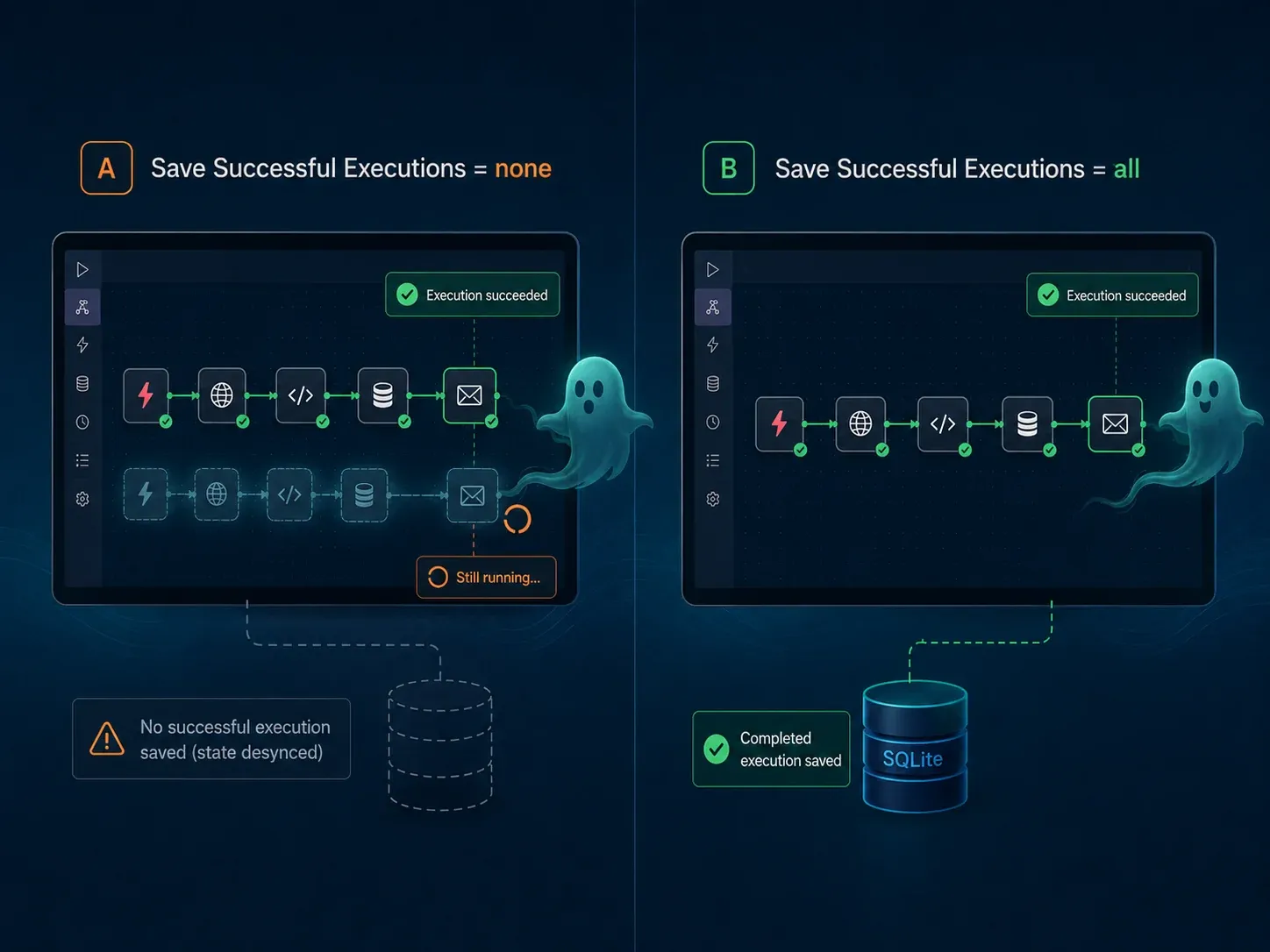
That control matters because it removes several common confounders: the webhook itself did not fail, the workflow was not complex, and the two cases did not use different n8n versions. On this n8n 2.36.6 SQLite instance, changing successful execution storage from none to all also changed whether the execution row finalized correctly.
The importable workflow JSON files, exact SQL output, and version matrix are published in the GitHub reproduction asset.
Why this matters beyond a stale UI status
If only the browser UI failed to refresh, the operational impact would be limited. Here the persisted row itself remains:
finished = false
status = running
stoppedAt = NULL
That can distort or complicate:
- counts of genuinely running executions;
- execution-history and monitoring queries;
- pruning and retention behavior around abnormal rows;
- operational scripts that check for unfinished work;
- database growth and execution-history governance.
So if business actions succeed while running rows accumulate, refreshing the UI is not an adequate diagnosis.
The safest workaround I can verify today
As of August 29, 2026, issue #37040 has no public fix PR, so I will not claim that a particular upgrade solves it. The only mitigation directly verified by this A/B is:
If your privacy, retention, and storage policy permits it, temporarily change Save successful production executions from Do not Save to Save, and control retention with execution pruning.
This is evidence-based rather than speculative: the saveDataSuccessExecution=all control on the same three-node production webhook finalized correctly.
It is not a permanent fix. Saving successful executions increases stored execution data, so evaluate retention windows, pruning configuration, and whether workflow data can contain sensitive business or user content.
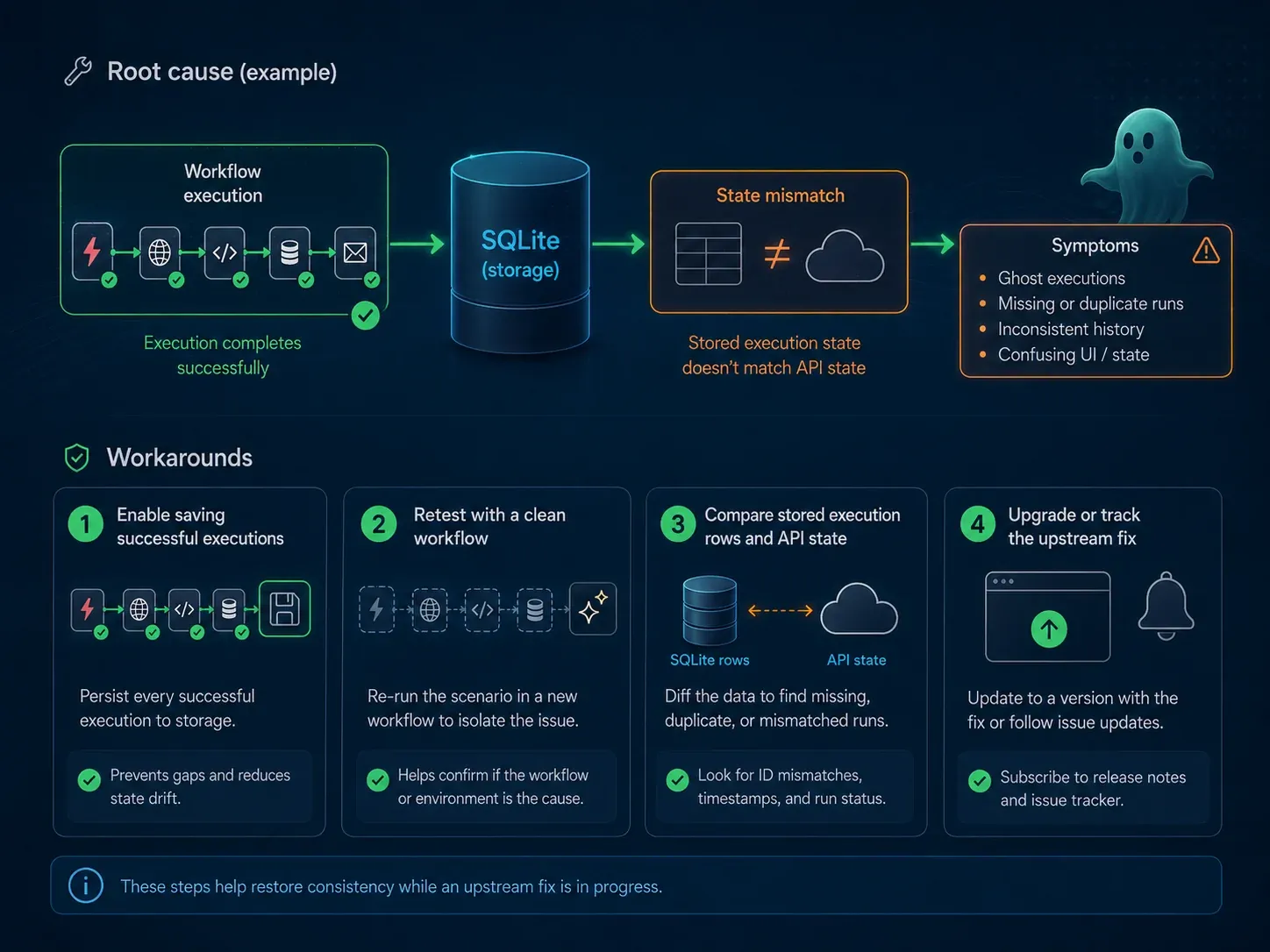
Do not use a direct database UPDATE as the generic fix
A table full of rows like:
finished = 0
status = running
stoppedAt = NULL
makes a bulk UPDATE execution_entity tempting. I do not recommend that as a generic repair.
execution_entity is not just a display table. Execution state can interact with execution data, pruning, insights, metadata, and lifecycle logic. Changing running to success does not prove related state is consistent.
If production already contains many zombie rows, a safer order is:
- take a complete database backup;
- verify that the save-none condition matches this reproduction;
- reproduce it in an isolated environment;
- enable successful execution saving temporarily and confirm new executions close normally;
- wait for upstream cleanup guidance, or design a version-specific migration only after understanding the exact schema and related rows.
PostgreSQL versus SQLite: the evidence boundary
The upstream #37040 reporter used PostgreSQL. This XBSTACK A/B used SQLite and produced the same:
finished = false
status = running
stoppedAt = NULL
That means the evidence does not support calling this PostgreSQL-specific. However, I did not complete an independent local PostgreSQL reproduction because Docker Hub repeatedly timed out while pulling postgres:16-alpine.
The defensible summary is therefore:
- PostgreSQL: real upstream report in n8n issue #37040;
- SQLite: independent XBSTACK A/B reproduction;
- shared condition: n8n 2.36.6 with successful execution saving disabled;
- root cause: not publicly finalized by the upstream project yet.
How to retest once a fix is released
When #37040 gains a linked PR or a release explicitly fixes it, do not rely on the changelog alone. Re-run the same minimal fixture:
Webhook → Set → No Operation
saveDataSuccessExecution = none
and verify that successful runs no longer leave:
finished=0 / status=running / stoppedAt=NULL
Then re-run the saveDataSuccessExecution=all control to make sure normal saved successful executions still finalize correctly.
The public reproduction keeps both workflow JSON fixtures and the original result so future releases can be compared against the same test rather than a moving target.
Bottom line
If an n8n production workflow has already succeeded but the execution remains running with finished=false and stoppedAt=NULL, check whether Save successful production executions is set to Do not Save before diagnosing a genuinely hung node.
On n8n 2.36.6, the SQLite A/B here and the upstream PostgreSQL report point to the same execution-finalization boundary. There is no public final fix yet. The most defensible current mitigation is to evaluate enabling successful execution saving plus pruning, rather than bulk-editing execution states in the database.
Related troubleshooting:
- n8n Code Node Task request timed out: Task Runner diagnosis
- n8n AI Workflow error handling and retries
- n8n production webhook URL, reverse proxy, and 404 troubleshooting
- AI Workflow Automation in production
Continue through the production automation path
The workflow hub connects self-hosting, queue mode, webhooks, retries, observability and n8n implementation cases into one production-oriented learning path.
Next step: make the workflow operable
Full decision path →Continue with retries, queues, idempotency, observability, or cost controls that keep the workflow reliable.

DISCUSSION
Questions, verification and corrections
Sign in to comment. Every new comment is reviewed before publication; while pending, it is visible only to you and the administrator.