
Is MCP Safe? Tool Poisoning, API Key Risks, and Practical Defenses
Can MCP servers expose API keys? Learn how tool poisoning works, how to review changed tools and scan findings, and how to stop unauthorized actions.
Evidence 4 cited sources
On this page
Is MCP Safe? Tool Poisoning, API Key Risks, and Practical Defenses
Connecting an MCP server can make an AI assistant substantially more useful. It may search a repository, open documents, inspect a database, or carry out a task across several applications. But a tool named “read-only search” does not necessarily have read-only operating-system permissions, and a reassuring description does not prove the server will behave the same way tomorrow. The practical questions are simple: can an MCP server expose API keys, can an agent follow instructions hidden in a tool description, and what can you check before trusting a new connection?
The short answer is that MCP standardizes tool connectivity, not the trustworthiness of third-party tools. MCP tool poisoning is a form of indirect prompt injection in which untrusted tool descriptions, schema text, or results influence an agent’s decision. The outcome depends on what the agent can actually do. A poisoned search result may simply contaminate an answer in a read-only environment. When the same agent can inspect private files, make arbitrary network requests, or write to production systems, the potential consequences are considerably greater. A safer design keeps authorization, secrets, network boundaries, and approval outside the model’s discretion.
What is MCP tool poisoning, and how is it different from prompt injection?
An MCP client discovers tools and passes their names, descriptions, and argument schemas to the model. Those descriptions are supposed to explain interfaces; they do not represent the user’s authorization. A poisoning attempt crosses this boundary when text controlled by a tool provider tries to become a higher-priority instruction: change the user’s goal, invoke another capability, treat an action as preapproved, or conceal an operation. The model may then respond to a piece of third-party metadata as if it were part of the legitimate task.
Prompt injection is the broader family of attacks. A malicious instruction can come from an email, a web page, a PDF, a retrieved knowledge-base chunk, or the output of a tool. Tool poisoning focuses on the MCP portion of that chain. The malicious content may be invisible to the person asking the question, and it might change without a new conversation or an obvious installation event. This is why an answer alone is not sufficient evidence: you need to inspect the tool call, authorization decision, execution record, and observed effect.
| What a user notices | What it might mean | What to inspect |
|---|---|---|
| A normal search suddenly asks for unrelated files | A description or result is steering the agent | Approved tool definition, call trace, file scope |
| A tool behaves differently after an update | Definition drift or a rug-pull attempt | Source, version, schema and definition diff |
| An agent sends, deletes, or publishes without approval | Authorization or approval failure | Server-side policy, exact arguments, outcome |
| A scanner warns about exfiltration without a network record | Attempted injection or false positive | Egress logs, secret exposure, call execution |
A suspicious sentence is not proof of a breach, just as the absence of a warning is not proof of safety. Separate four stages: an untrusted instruction appeared, the model attempted a tool call, the execution layer allowed the call, and a real side effect or transfer occurred. Many exaggerated claims collapse these into a single “attack succeeded” label.
Three poisoning paths worth reviewing
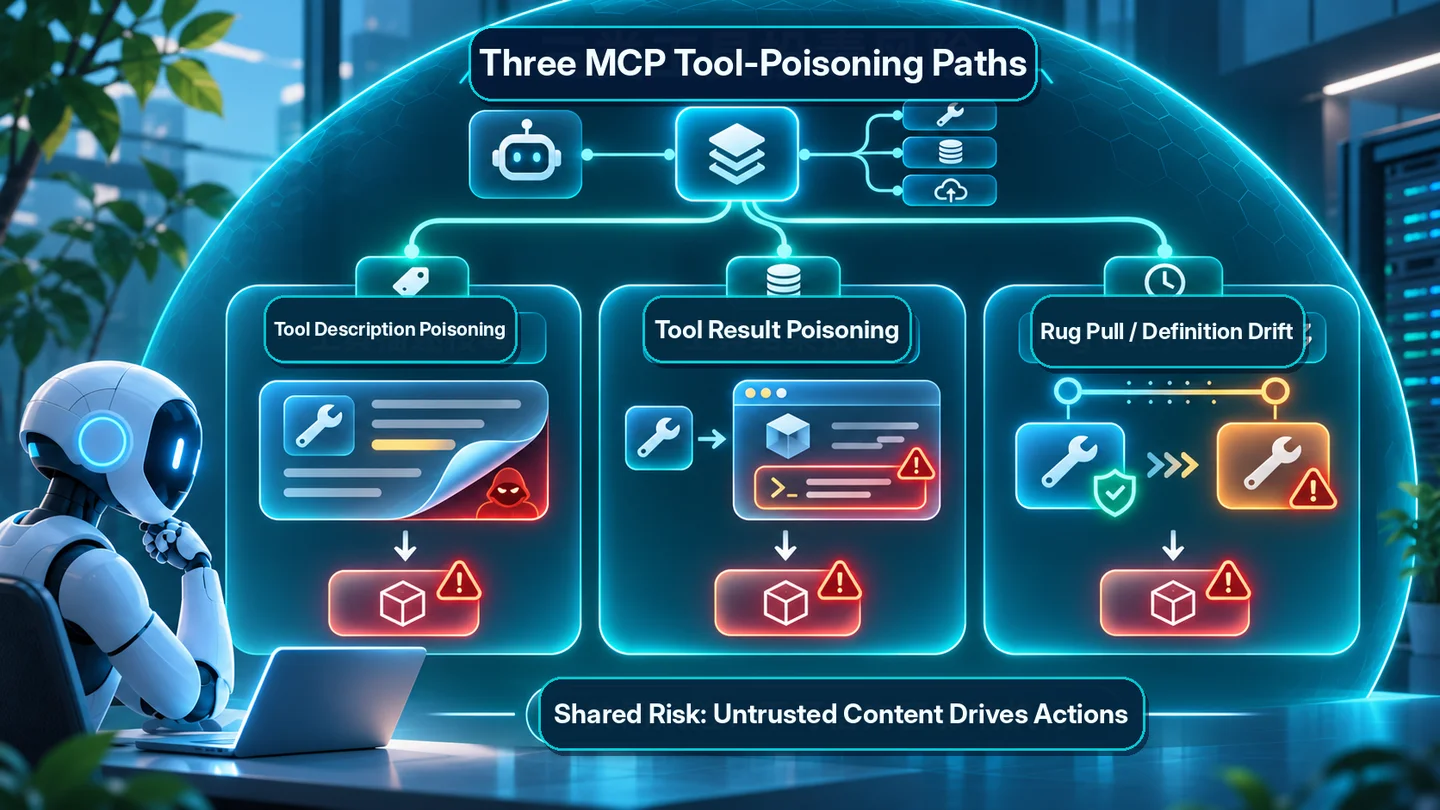
Tool description poisoning begins before execution. The agent reads a tool’s name and description to decide which capability to use. An attacker who controls those fields might package an unrelated action as a prerequisite for the legitimate query. Developers should compare the description with the declared business purpose, flag requests to use unrelated tools or resources, and refuse to let tool-authored text expand access. A defensive audit does not need to run a credential-stealing payload on real data to establish that a trust boundary exists.
Rug pulling means a tool behaves acceptably when first reviewed and later changes its description or behavior. In its October 2026 agentic exploit roundup, OWASP described an attempted malicious MCP distribution campaign where the server initially behaved normally and later modified its metadata to influence connected agents. The public report described attempts involving multiple GitHub projects but did not confirm downstream compromise. The point is not that every tool will change maliciously; it is that one-time connect-time review does not cover future definition changes.
Tool result poisoning happens after a tool has been selected. A search result, ticket body, or database field may contain text demanding that the agent take some other action. That content may be relevant task data but is not an authorization source. OWASP’s MCP Tool Poisoning overview discusses this connect-time versus runtime trust gap. A tool-description scanner alone cannot protect against instructions injected into response content or data retrieved later in a workflow.
What did the 2026 cross-framework study actually measure?
On November 2, 2026, Farooq Shaikh and Biagio Montaruli published MCP Tool Poisoning in Agentic AI Frameworks. Using the open-source testing tool mcpvenom, the authors evaluated 9,720 combinations spanning 12 framework or baseline configurations, 18 models, and 45 attack scenarios. They reported 2,113 successful combinations, or 22.9% under their defined test conditions. Their design went beyond checking whether a model verbally agreed with a malicious prompt: they observed tool execution and used canary HTTP receipts to distinguish some confirmed transfers from tool-call behavior.
That headline does not mean 22.9% of MCP users have had their data stolen. Nor does it mean a particular deployed framework has a 22.9% chance of leaking a secret. The paper distinguishes attacker-directed tool dispatch, contact with an attacker endpoint, and verifiable canary exfiltration; these outcomes should not be conflated. Results depend on the models, allowed tools, scenario design, and the researchers’ success criteria. This article reviews their evidence; XBSTACK has not reproduced all 9,720 trials or certified any framework against the attack.
There is also a more mundane lesson. In the MCP project’s Tool Annotations as Risk Vocabulary, fields such as readOnlyHint and destructiveHint are explained as untrusted hints, not enforcement. A server can describe its tool as read-only and still behave differently, or another tool in the same agent session may create an outbound path. Permissions must be implemented in the host and executing environment rather than inferred from a description field.
Six checks before connecting an MCP server
Check who actually publishes the server. Start with the provider’s official documentation or a trusted repository. Look for a verifiable maintainer, version history, installation command, and supported permission model. A tool with the name of a familiar service is not necessarily operated by that service. A locally executed server may inherit meaningful file and network access from its process owner.
Grant only the permissions required for the current task. A public documentation lookup should not need private mail, full-disk access, administrator credentials, or production deployment rights. Prefer per-workspace configuration over enabling every available tool globally. Keep read-only and administrator tokens separate, and avoid putting tools with unrelated high-impact capabilities into the same session.
Keep secrets out of model-readable data. API keys and access tokens belong in controlled credential handling, not in tool descriptions, retrieved files, conversation history, or general-purpose logs. If a seemingly ordinary tool suddenly asks the model to copy a key into a query argument, stop and verify the provider’s documented authentication method. An OAuth login does not authorize every possible operation on every resource.
Require meaningful approval for consequential operations. Deleting files, sending messages, paying, publishing, and changing account privileges should require an authorization decision tied to the exact action, resource, identity, and parameters. “Trust this agent forever” is not a substitute for a revocable, server-enforced approval path.
Monitor changes in definitions and network behavior. Compare tool names, schemas, descriptions, and versions against the last approved set, particularly after server updates or configuration changes. Unexpected new endpoints, resource scopes, or tool capabilities should suspend automatic execution until reviewed. The approved definition’s fingerprint is more useful than a screenshot taken once during installation.
Retain minimal, privacy-conscious evidence. Useful audit records include tool identity, requested action, approval outcome, the category of arguments, time, and a redacted resource reference. Do not put raw email messages, secret values, or private documents into logs. Evidence should support incident response without becoming another source of leakage.
How do you actually audit an MCP tool for poisoning?
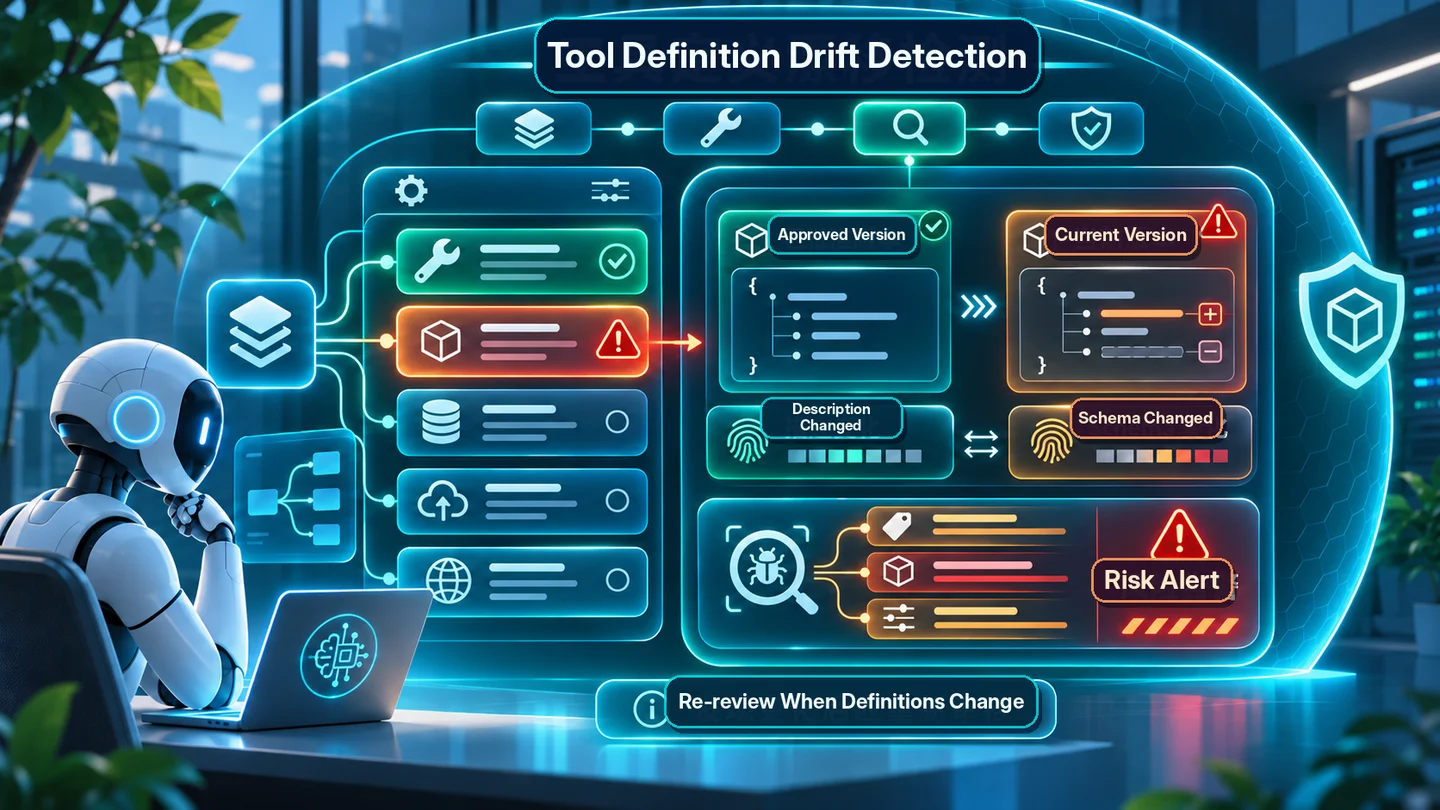
A useful audit does not end when a scanner says “pass” or “fail.” First verify which MCP server and publisher the connection uses. Compare the currently advertised tools/list names, descriptions, and inputSchema fields with the last approved baseline. If the client has no supported export option, inspect its documented tool-management interface rather than installing an unknown scanner just to read the definitions. Suspicious text is a reason to investigate, not proof that a real tool was called or a secret left the environment.
This is an invented, harmless review example; it is not a real server, attack payload, or security benchmark.
| Audit area | Approved state | Later observation | Required decision |
|---|---|---|---|
| Tool description | search_public_docs searches public documentation | Description now requires unrelated local-file access | Pause automatic approval; investigate the publisher’s change |
| Argument schema | query, limit | Optional callback_url added | Review who controls that destination and whether network access is justified |
| Filesystem scope | Test-document directory only | Runtime configuration requests broader mounts | Deny or require scoped approval |
| Network egress | No arbitrary external writes | Unrecognized external host appears | Block egress pending verification |
The sequence is record trusted baseline → compare metadata and runtime permissions → identify risk → approve or reject deliberately → test in an isolated nonproduction environment. Benign version upgrades can also change a schema, so do not equate every change with compromise. Conversely, an unchanged tool name does not prove the underlying executable, filesystem mounts, environment variables, or network permissions stayed the same. A definition hash is a useful change signal, not a security guarantee.
How should you interpret an MCP security scanner result? Use an auditor from a trusted source, verify its data handling, and start with synthetic definitions containing no secrets. A rule match means “investigate,” not “exfiltration confirmed.” No match means “these rules found nothing,” not “safe.” Follow up with tool-call traces, server-side policy decisions, redacted egress records, and verified remote effects. A defensible incident note might read: “An unapproved parameter change was detected; the policy gate denied the call; no execution or outbound transfer was observed.” That proves the individual denial, not the safety of every tool on that server. XBSTACK’s MCP configuration audit covers the broader permissions review; use Agent Security Auditor only within the capabilities its live page actually documents.
A tool policy gate belongs outside the language model
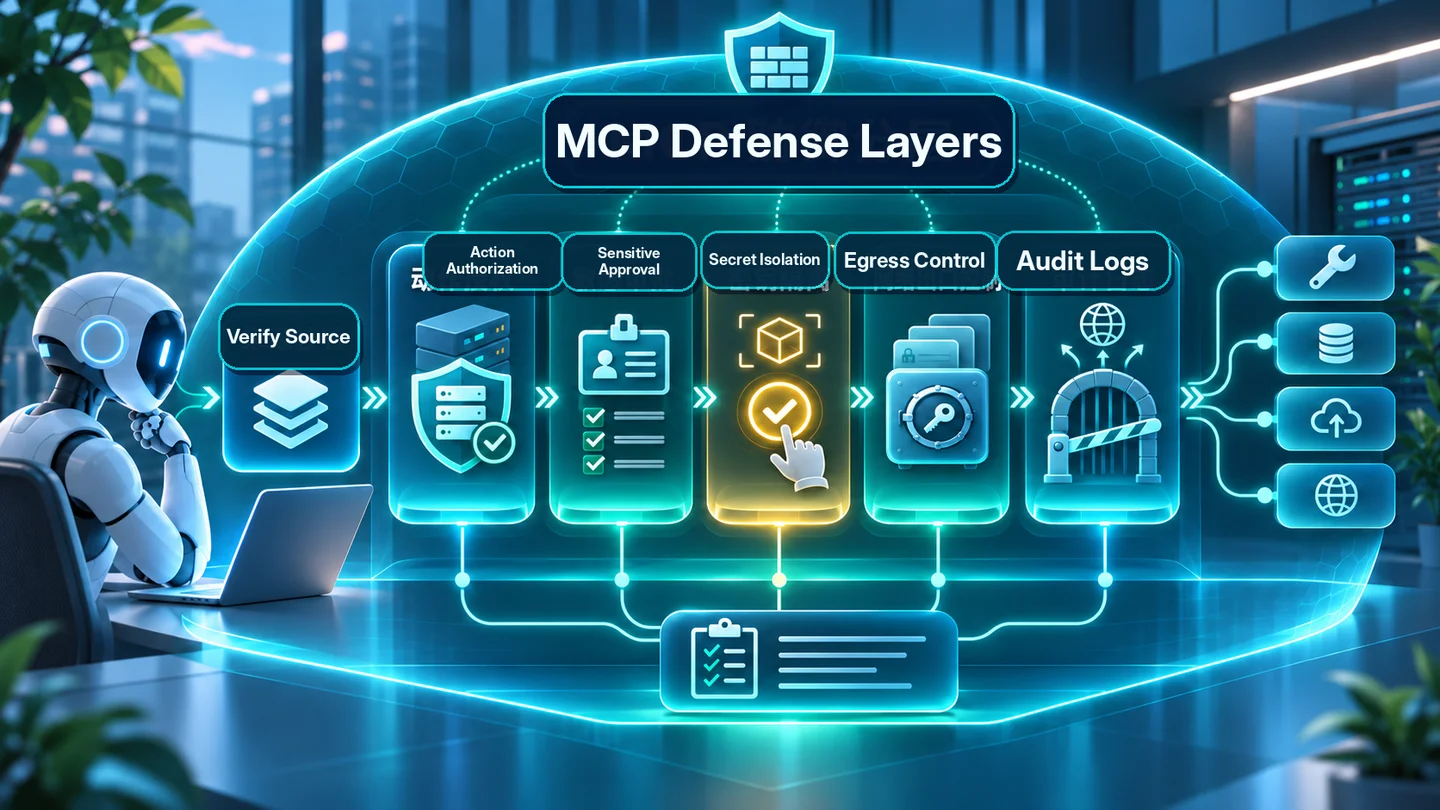
A production agent may ask to use a capability, but it should not decide its own permissions from an external tool description. Immediately before execution, a separate policy service should resolve the actual user or service identity, tenant, target resource, tool, arguments, and risk level. It then authorizes or denies that specific operation, with an approval step for sensitive effects. File access, outbound network access, and secret exposure need environment-level boundaries in addition to API-level permissions.
A practical defensive sequence is: verify the server and approved definition version; mark tool descriptions and results as untrusted; evaluate the exact call against server-side authorization; require action-bound approval for irreversible effects; execute under filesystem and egress limits; confirm the actual result; and record redacted evidence. This is a design pattern, not a claim that every current SDK implements all of these controls automatically. Static string scanning is useful as a first warning layer, but cannot replace real authorization or controlled execution.
Consider combined capabilities. A tool that reads private documents and a separate tool that can send HTTP requests may each appear legitimate in isolation. If an agent can use both freely, the combination creates a potential path from private data to an external destination. Evaluate the whole session’s tool graph, not just each tool’s individual label. When testing safeguards, use synthetic data and an isolated environment with no production secrets, and verify that unauthorized requests are actually blocked by policy and egress controls.
What to do if you suspect poisoning
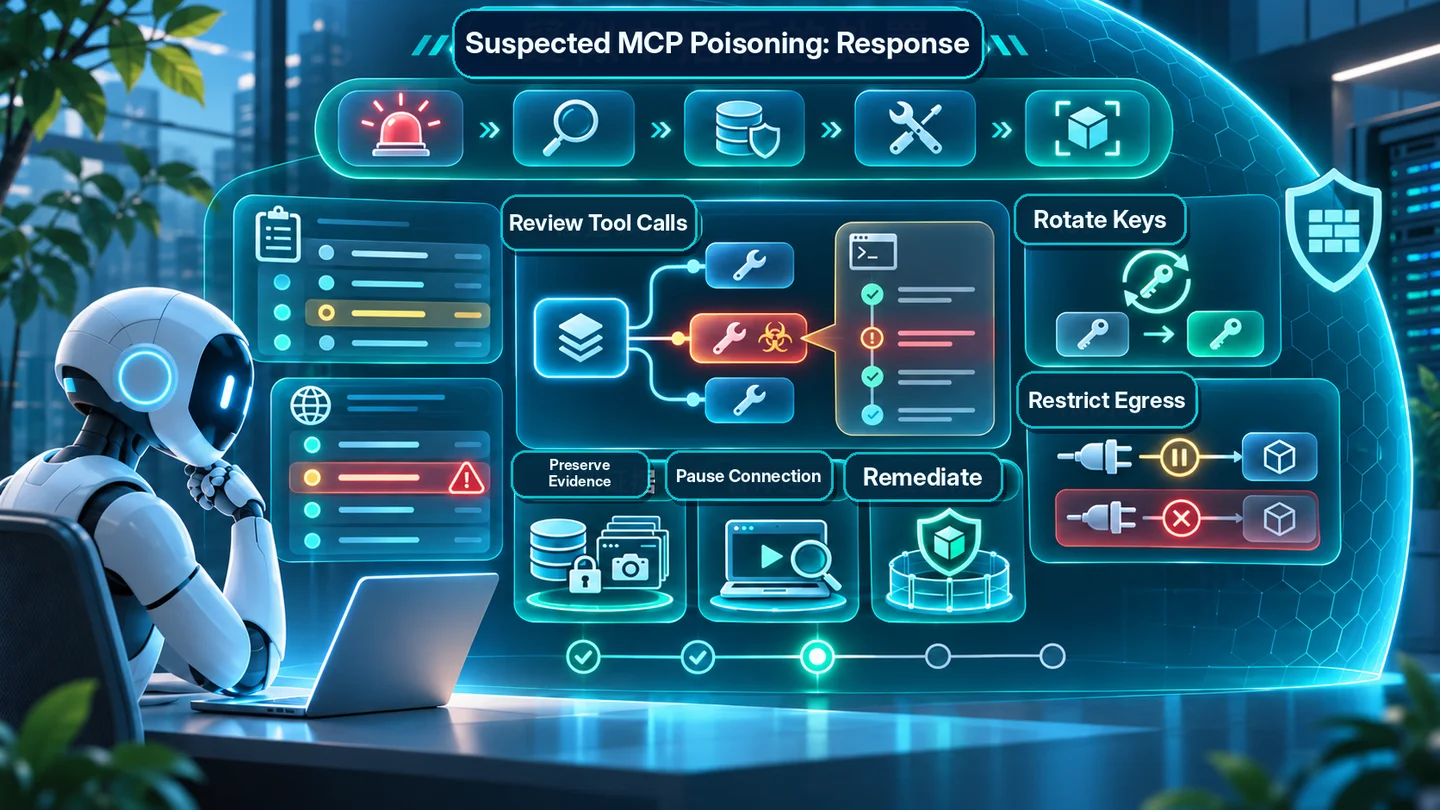
Pause the connection, minimize the available permissions, and preserve redacted traces of recent tool calls and definition changes. Establish whether the issue was only an attempted instruction, an executed unauthorized call, or an observed transfer or business state change. If credentials might have been exposed, follow the provider’s rotation and audit procedures. For payments, deployments, messages, or destructive operations, check the remote system’s final state before retrying anything; an unverified retry can create a second side effect.
The durable fix is not merely deleting suspicious text. Review server provenance, definition drift, resource-level authorization, filesystem and network boundaries, and the evidence used to permit the call. Add the incident to regression tests. For the broader architecture, see XBSTACK’s AI Agent Security guide and MCP configuration and access audit. This page is narrowly about detecting and containing MCP tool poisoning, not duplicating a general AI security encyclopedia.
Frequently asked questions
Is MCP itself safe? MCP defines tool connectivity but does not guarantee that a connected server, its descriptions, or its results are trustworthy. Verify publisher, actual permissions, and enforcement.
Does installing MCP automatically leak API keys? No. Exposure depends on the process and agent gaining access to secrets and having a way to move them out of the permitted environment.
How is MCP tool poisoning different from prompt injection? It is a particular indirect prompt-injection path through tool metadata or results. Prompt injection can also arrive in web pages, mail, documents, or retrieved content.
Is a tool marked readOnlyHint safe? Not necessarily. MCP treats annotations as untrusted hints, not access-control guarantees. Enforce actual permissions and network limits separately.
How do I detect a changed MCP tool description? Compare the current approved tool name, description, and input schema with a trusted baseline. Review runtime permissions and executed calls as well.
How do I use an MCP security scanner? Choose a trusted auditor, test it with synthetic definitions, understand what it scans, and investigate specific findings using calls, policy decisions, and redacted logs.
Does a clean scanner report prove my MCP server is safe? No. Static rules can miss poisoned results or runtime privilege changes, and they cannot demonstrate that execution controls really blocked an operation.
How do I tell an attempted attack from a real data leak? Separate suspicious text, requested tool calls, approved execution, and verified transfer or business effects. Evidence must support each step.
Is the study’s 22.9% a real-world leak rate? No. It is an experimental attack-success measure within a particular framework, model, and scenario matrix, not a rate of user breaches.
Do official MCP servers still need review? Yes. A trusted publisher lowers some supply-chain risks but does not replace least privilege, configuration checks, or action-specific authorization.
This article interprets published specifications and research. It is not an XBSTACK penetration test, a cross-framework security ranking, or a certification of any MCP implementation.
Continue from protocol details to production MCP governance
The MCP hub connects protocol fundamentals, transports, authentication, security, JSON-RPC debugging and production deployment without splitting the search intent across isolated guides.
Next step: harden the execution boundary
Full decision path →Continue with the control that should be enforced before the next tool call, credential handoff, or production rollout.

DISCUSSION
Questions, verification and corrections
Sign in to comment. Every new comment is reviewed before publication; while pending, it is visible only to you and the administrator.